WhatsApp marketing in Nigeria has moved beyond manually replying from one phone. A serious programme needs a verified business sender, consent, approved templates, audience controls, scheduling, link tracking, conversation handling, and reporting. This guide explains the complete 2026 workflow using the Yournotify dashboard and the WhatsApp Business Platform.
The market context is compelling. DataReportal reports 165 million active cellular connections in Nigeria at the end of 2025 and 109 million internet users. Those figures do not prove that every Nigerian uses WhatsApp, but they show why a mobile-first channel plan matters. WhatsApp works best alongside SMS and email: WhatsApp supports rich, conversational experiences; SMS reaches mobile numbers without requiring mobile data; email remains useful for longer-form communication and records.
The practical rule: earn permission first, choose the correct message category, send useful content, and measure customer outcomes—not just message volume.
Table of Contents
What is the WhatsApp Business API?
The WhatsApp Business Platform—often called the WhatsApp Business API—is the infrastructure businesses use to send and receive WhatsApp messages at scale. Unlike the consumer app, it supports approved message templates, multiple operational users, campaign workflows, integrations, automation, webhooks, and structured reporting. Yournotify provides the working interface around that infrastructure, bringing the sender, templates, audience, tracking, campaign controls, and analytics into one dashboard.
| Option | Best suited to | Operational difference |
|---|---|---|
| WhatsApp consumer app | Personal communication | One-person, personal messaging |
| WhatsApp Business app | Small businesses handling chats manually | Business profile and basic messaging tools |
| WhatsApp Business Platform through Yournotify | Teams running campaigns, automation, support, or product notifications | Approved templates, audiences, tracking, reporting, API delivery, and team workflows |
Before setup: consent, purpose, and Nigerian data protection
A phone number is personal data. The Nigeria Data Protection Commission explains that consent can be obtained in writing, orally, electronically, or through another clear action by which the person knows they are consenting. For marketing, use a specific opt-in that names WhatsApp and explains the type of messages the person will receive. Keep the source and date of consent, honour opt-outs promptly, and do not upload purchased or scraped lists.
- Good opt-in: an unchecked form box that says the person agrees to receive WhatsApp product updates and offers from your business.
- Good operational opt-in: a customer asks to receive order or appointment updates on WhatsApp.
- Weak practice: assuming that providing a phone number for delivery automatically permits unrelated promotions.
- Audience hygiene: use international-format numbers, remove invalid records, deduplicate contacts, and retain the opt-in record.
Step 1: connect a WhatsApp sender in Yournotify
In the Yournotify dashboard, open SenderID → WhatsApp → Create. Choose the connection type, enter the WhatsApp phone number, and continue to the business profile connection. The sender record links the number, business display identity, WhatsApp Business Account, and the templates available for that sender.
- Use a number your team controls and can keep available for the business.
- Use the real customer-facing business name and consistent brand information.
- Complete the Meta business and phone-number checks presented during connection.
- After connection, confirm that the sender appears under SenderID → WhatsApp before building a campaign.
Step 2: create the right WhatsApp message template
Open Templates → WhatsApp → Create. Yournotify exposes the operational fields required to prepare a template: template name, category, language, header, body, footer, placeholder examples, buttons, media, and an option that allows automatic recategorisation when that improves approval chances. Templates are submitted for review, so write the message for one clear purpose.
The three WhatsApp template categories
| Category | Use it for | Typical Nigerian example |
|---|---|---|
| Marketing | Offers, product announcements, reactivation, recommendations, and promotional campaigns | “Get 15% off your next order in Lagos this weekend.” |
| Utility | A specific update connected to an agreed transaction, account, booking, or service | “Your order {{1}} is out for delivery and should arrive by {{2}}.” |
| Authentication | One-time passwords and identity verification | “{{1}} is your verification code. Do not share it.” |
Do not mix promotional language into a utility template. A delivery update followed by an unrelated offer can be classified as marketing. The category affects review, customer expectation, and pricing, so treat classification as part of campaign planning rather than an administrative afterthought.
How to structure a high-quality template
- Name: use a durable internal name such as
order_delivery_updaterather than a temporary campaign title. - Language: choose the language actually used in the message. Create separate language versions where needed.
- Header: use short text or relevant image, video, or document media when it adds context.
- Body: identify the business, explain why the recipient is receiving the message, and make the next step clear.
- Placeholders: provide realistic examples for every variable such as customer name, order number, date, or amount.
- Footer: use it for concise context or opt-out guidance—not essential transaction details.
- Buttons: use a clear call-to-action, phone, URL, or quick reply. Avoid competing actions.
Step 3: prepare contacts, lists, and segments
Yournotify can send to a saved list, a behavioural or profile segment, or a controlled pasted audience. Lists are useful for stable groups; segments are better when eligibility changes based on attributes or behaviour. Before sending, confirm country codes, consent, segment conditions, placeholder data, suppression rules, and the number of expected recipients.
Step 4: create and test a WhatsApp campaign
Open WhatsApp → Create. Enter a campaign name, select the WhatsApp sender, choose the audience source, and select the approved template associated with that sender. Fill every personalization value, attach required media, and use the test action before submitting the campaign.
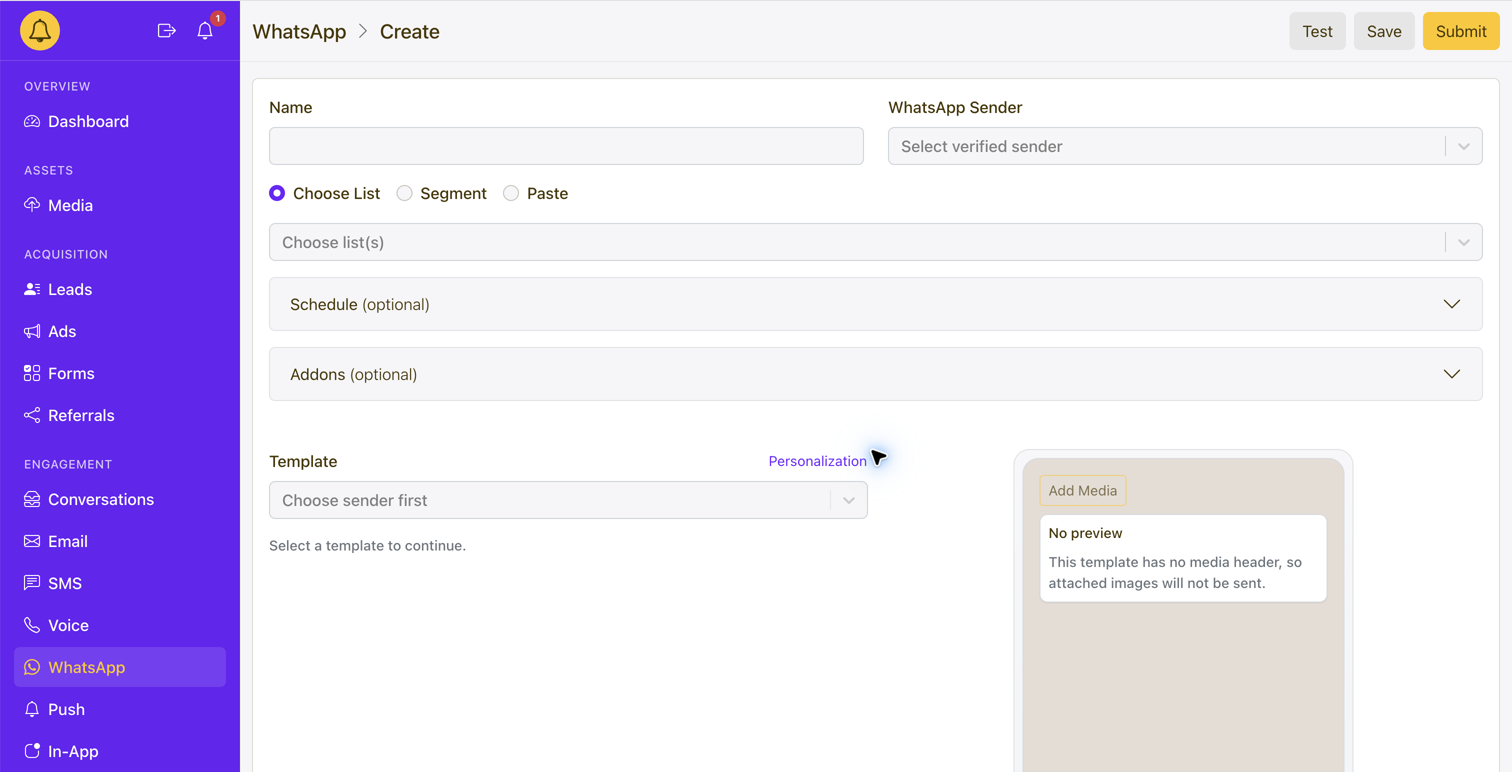
- Audience: choose a list, segment, or paste only consented contacts.
- Schedule: choose the send date, time, and timezone; use Africa/Lagos when the campaign is planned in West Africa Time.
- UTM tracking: add consistent source, medium, campaign, and content values for website analytics.
- WhatsApp link tracking: enable tracked links where click measurement is appropriate.
- Tracking domain: use a branded domain to improve trust and maintain consistent campaign links.
- Test: send to an internal number and inspect the final message, media crop, variables, button destination, and mobile landing page.
- Save versus Submit: save unfinished work; submit only after the sender, audience, template, timing, and test are correct.
Step 5: monitor delivery, engagement, and conversations
The campaign list gives the operational view of each send, while the campaign analytics view supports charts and exports. Evaluate the funnel rather than one isolated number.
| Metric | What it tells you | What to investigate |
|---|---|---|
| Targeted recipients | The intended campaign audience | Unexpected changes in segment or list size |
| Sent | Messages accepted for processing | Sender, funding, scheduling, or validation failures |
| Delivered | Messages delivered to recipients | Number quality, availability, or provider errors |
| Read | Delivered messages opened where the signal is available | Weak relevance, timing, or sender recognition |
| Failed | Messages that could not be delivered | Invalid numbers, template problems, sender configuration, or policy restrictions |
| Tracked clicks | Visits through tracked campaign links | CTA clarity, offer strength, page speed, and link correctness |
| Replies and conversations | Customer intent generated by the message | Response time, routing, ownership, and conversation quality |
| Conversions | The business outcome after engagement | Landing-page friction, checkout, sales process, or attribution |
Use Yournotify Conversations to continue customer replies instead of treating the campaign as a one-way broadcast. Assign ownership, preserve context, and define what happens when a customer asks a question, requests help, or responds with buying intent.
WhatsApp campaign ideas for Nigerian businesses
- Ecommerce: order confirmations, delivery updates, back-in-stock alerts, cart recovery, and repeat-purchase offers.
- Fintech: onboarding progress, transaction updates, KYC reminders, fraud education, and consented product announcements.
- Education: enquiry follow-up, application reminders, admission updates, fee notices, and class information.
- Healthcare: appointment reminders and service updates that avoid exposing sensitive information unnecessarily.
- Travel and logistics: booking confirmations, itinerary changes, pickup notices, and delivery status.
- Retail and hospitality: reservations, loyalty updates, launches, personalised offers, and service recovery.
Common mistakes that reduce performance
- Sending marketing messages without a specific WhatsApp opt-in.
- Using one template for several unrelated intentions.
- Calling promotional content a utility update.
- Uploading a broad list without number validation, deduplication, or suppression.
- Leaving placeholders blank or supplying unrealistic approval examples.
- Using generic shortened URLs instead of a trusted tracking domain.
- Sending without a test message or without checking the mobile landing page.
- Measuring only “sent” rather than delivery, clicks, replies, conversions, opt-outs, and complaints.
- Running campaigns without a person or workflow responsible for replies.
A practical 2026 WhatsApp campaign checklist
- Purpose and template category are clear.
- Consent source and audience eligibility are documented.
- WhatsApp sender is connected and active.
- Template is approved for the selected sender and language.
- All placeholder values are mapped and tested.
- Links use intentional UTM values and the correct tracking domain.
- Timing and timezone match the audience.
- Test message has been reviewed on a real phone.
- Conversation ownership and response expectations are defined.
- Analytics and conversion measurement are ready before launch.
Frequently asked questions
Can I send WhatsApp marketing messages to any Nigerian phone number?
No. Use contacts who have knowingly opted in to receive WhatsApp messages from your business. A phone number collected for another purpose is not automatically permission for unrelated promotions.
Does every WhatsApp campaign need a template?
Business-initiated messages use approved templates. Customer-initiated conversations have different rules within the permitted service window, but teams should still use clear, relevant, policy-compliant replies.
Can Yournotify send WhatsApp messages through an API?
Yes. Yournotify supports dashboard campaigns and developer delivery. Use the API documentation when product events, transactions, or internal systems should trigger approved WhatsApp messages.
What should I measure first?
Start with valid audience size, sent, delivered, failed, read where available, clicks, replies, conversions, opt-outs, and complaints. Compare results by purpose and audience rather than combining every WhatsApp send into one average.
Build your WhatsApp programme in Yournotify
Yournotify connects sender setup, approved templates, lists and segments, scheduling, personalization, media, UTM and link tracking, conversations, charts, exports, APIs, and multichannel follow-up. Explore Yournotify WhatsApp Marketing or sign in to the dashboard to begin.