Bulk SMS remains one of Nigeria’s most practical customer communication channels. It works on basic phones, does not require mobile data, and can support promotions, reminders, service alerts, transactional updates, and one-time passwords. This 2026 guide explains how to plan and send SMS in the Yournotify dashboard, when to use the SMS API, how Sender IDs and DND affect delivery, and which metrics matter.
Nigeria had 165 million active cellular connections at the end of 2025, according to DataReportal’s Digital 2026 Nigeria report. The same report counted 109 million internet users, which also means a substantial part of the population was not online. That is why SMS still matters: it complements internet-dependent channels and gives businesses a direct route to customers who have consented to receive messages.
Table of Contents
What is bulk SMS marketing?
Bulk SMS marketing is the controlled delivery of one campaign to many opted-in mobile contacts. A professional system does more than paste numbers into a box: it manages sender identity, audience data, message length, scheduling, links, delivery reporting, suppression, and campaign history. Yournotify brings these controls into one workflow and connects SMS to email, WhatsApp, rewards, referrals, and lifecycle automation.
Bulk SMS platform versus SMS API
| Method | Best for | How it works in Yournotify |
|---|---|---|
| Dashboard campaign | Marketing teams, operations teams, scheduled broadcasts, and segmented sends | Create a campaign, choose a Sender ID and audience, write the message, add tracking, test, schedule, and submit |
| SMS API | Product events, OTPs, transaction alerts, and system-triggered messages | Your application authenticates to the API and sends a structured request with sender, recipient, and message data |
| SMPP | High-volume systems requiring protocol-level connectivity and delivery receipts | Connect direct SMS infrastructure for throughput control and operational reporting |
Nigeria SMS compliance: consent and DND
The Nigerian Communications Commission introduced the 2442 Do-Not-Disturb service to help subscribers control unsolicited promotional messages. NCC materials explain that subscribers can text STOP to 2442 for full DND. Businesses should therefore separate promotional and transactional messaging, collect valid consent, maintain opt-out and suppression records, and use the appropriate route and Sender ID capability.
Nigeria’s data-protection rules also matter. Treat phone numbers, names, behavioural attributes, and campaign responses as personal data. Explain why data is collected, use it only for the stated purpose, secure access, and make withdrawal of consent straightforward.
Promotional, transactional, and OTP SMS
| SMS type | Purpose | Example |
|---|---|---|
| Promotional | Offers, launches, events, acquisition, and reactivation | “Save 15% on your next order before Friday. Shop: example.ng/sale. Reply STOP to opt out.” |
| Transactional | Updates tied to an account, order, booking, or service action | “Your transfer of NGN {{amount}} was completed. Reference: {{reference}}.” |
| OTP / authentication | Short-lived identity or transaction verification | “Your verification code is {{code}}. It expires in 5 minutes. Do not share it.” |
Do not disguise an advert as a transactional message. Keep OTPs free of promotions, use short expiry periods, avoid logging complete codes, and rate-limit repeated verification attempts. For sensitive or high-volume product messaging, use the API rather than manual campaign creation.
Step 1: create an SMS Sender ID
In Yournotify, open SenderID → SMS → Create. Enter the Sender ID, select its type and template or supporting information where required, and choose the intended capability. A Sender ID is the name customers see as the message source. It should be recognisable, consistent with the business, and appropriate for the intended traffic.
- Choose a concise brand or service identity customers can recognise.
- Separate promotional and transactional requirements where your routing or approval process requires it.
- Avoid misleading names, generic identities, or names belonging to another organisation.
- Allow time for review and activation before scheduling a critical campaign.
- Confirm the active Sender ID appears in the campaign composer before launch.
Step 2: prepare a clean, permission-based audience
Good SMS performance starts with the list. Use contacts who expect the message, store Nigerian numbers consistently in international format, deduplicate records, remove invalid entries, and suppress opt-outs. In Yournotify you can choose a saved list, target a segment, or paste a controlled set of recipients.
- Lists: stable groups such as event registrants or an imported customer cohort.
- Segments: audiences that change based on profile or behaviour, such as active customers in Lagos who purchased in the last 90 days.
- Pasted recipients: small, controlled operational sends—not a substitute for consent and audience governance.
Step 3: write an SMS people can understand quickly
An SMS should identify the sender, communicate one idea, and make the next action obvious. Keep the first line useful, avoid unnecessary abbreviations, and test the final character count. Unicode characters can reduce the number of characters available in each message segment, while a long message can be billed and delivered as multiple parts.
- Lead with the customer value or important update.
- Use one primary call-to-action.
- Include essential dates, amounts, references, or deadlines.
- Use personalisation only when the source data is trustworthy.
- Use a branded tracking domain where links are necessary.
- For promotional messages, provide a clear opt-out route and honour it.
Step 4: build and test the campaign in Yournotify
Open SMS → Create. Enter the campaign name, select the active Sender ID, write the message, and choose a list, segment, or pasted audience. The composer also supports optional scheduling, timezone selection, Google Analytics campaign parameters, SMS link tracking, and a tracking domain.
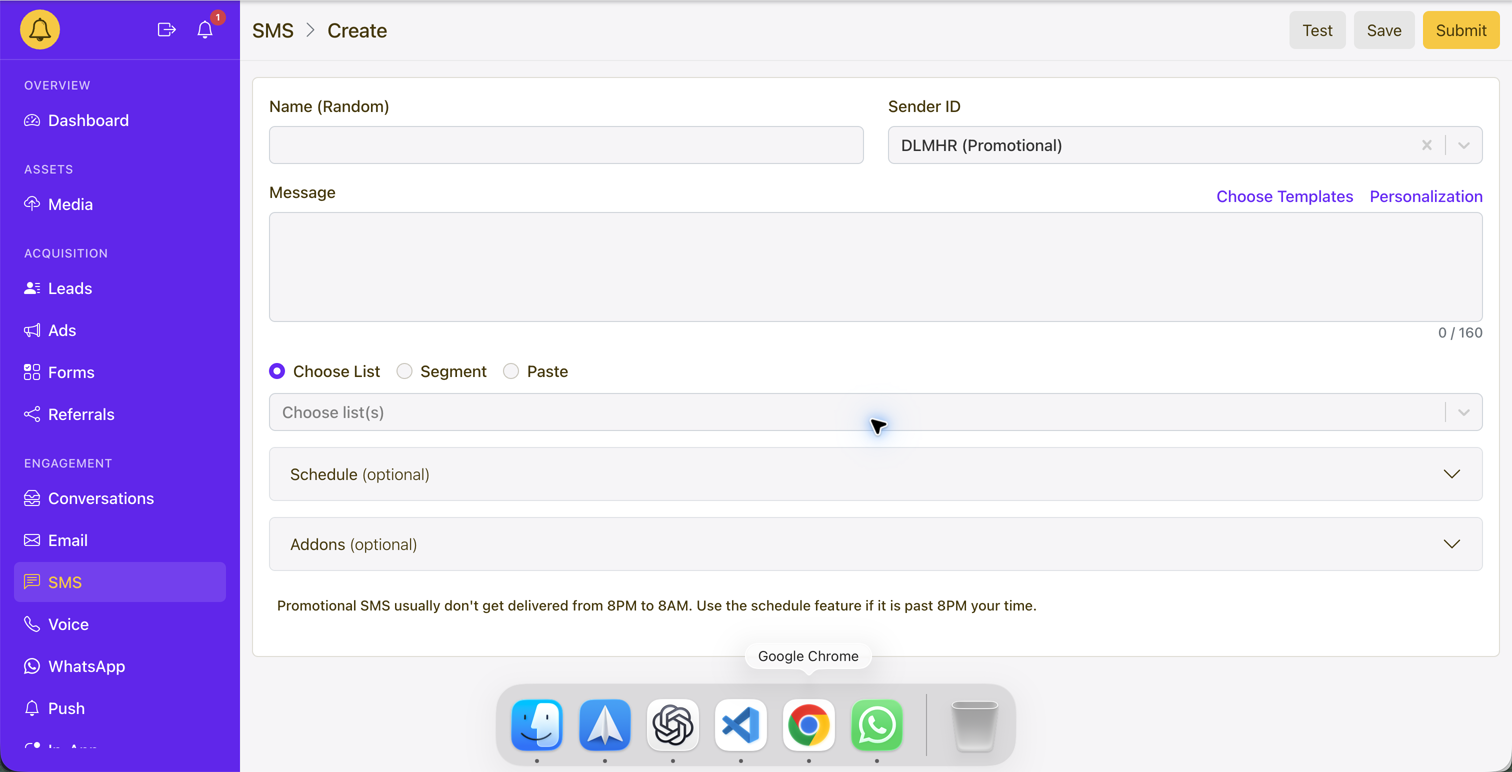
- Name: use an internal name that identifies purpose, audience, and date.
- Sender ID: confirm the identity and capability match the message type.
- Message: proofread the exact final text and inspect the segment count.
- Audience: preview the selected recipients and confirm eligibility.
- Schedule: use Africa/Lagos for campaigns planned in West Africa Time and avoid intrusive hours.
- Tracking: add consistent UTM parameters and enable SMS link tracking only where a link supports the campaign goal.
- Test: send to an internal phone, confirm the displayed sender, message order, link, landing page, and opt-out wording.
- Save versus Submit: save a draft while reviewing; submit only when the test and audience checks pass.
Step 5: understand delivery reports and campaign metrics
| Metric | Meaning | Action |
|---|---|---|
| Recipients / target | Contacts selected for the send | Compare with the intended audience and suppression count |
| Sent | Messages accepted for processing | Investigate funding, validation, or sender errors when lower than expected |
| Delivered | Messages confirmed as delivered where receipts are available | Monitor delivery rate by route, sender, and audience source |
| Failed / undelivered | Messages that could not be delivered | Review invalid numbers, unavailable devices, DND, sender approval, and routing feedback |
| Tracked clicks | Visits through Yournotify tracked links | Evaluate CTA, offer, timing, page performance, and trust |
| Conversions | Desired actions completed after the message | Use analytics and business data rather than treating clicks as revenue |
| Opt-outs and complaints | Audience dissatisfaction or changed preferences | Suppress immediately and investigate targeting, frequency, and consent |
A delivery receipt is not the same as a sale. Build a measurement chain from target → sent → delivered → clicked or responded → converted. Compare campaigns with similar purpose and audience. An OTP alert, a delivery update, and a weekend promotion should not share the same success benchmark.
How the Yournotify SMS API workflow works
Use the SMS API when your application—not a marketer—should decide when a message is sent. Typical triggers include account creation, OTP requests, payment status, order events, appointment reminders, security alerts, and system incidents. Your integration authenticates securely, sends the recipient, Sender ID and message payload, records the returned reference, and consumes delivery information for monitoring and reconciliation.
- Keep API credentials on the server; never expose them in browser or mobile-app code.
- Use idempotency or internal event controls so retries do not create duplicate messages.
- Validate and normalise Nigerian numbers before sending.
- Separate transactional and promotional workflows, credentials, templates, and monitoring where appropriate.
- Record provider references and delivery events without storing secrets or complete OTP values.
- Use exponential backoff for temporary errors and stop retrying permanent failures.
- Create rate limits, spend controls, alerting, and reconciliation for production traffic.
Bulk SMS campaign ideas for Nigeria
- Financial services: transaction notices, KYC reminders, security alerts, repayment reminders, and service availability.
- Ecommerce and retail: order updates, pickup notices, delivery alerts, promotions, restock messages, and loyalty reminders.
- Education: application deadlines, fee reminders, timetable changes, result notices, and class alerts.
- Healthcare: appointment reminders and carefully worded service updates that minimise sensitive information.
- Logistics and travel: booking reminders, dispatch notifications, tracking updates, and schedule changes.
- Events and communities: confirmations, access instructions, agenda changes, and time-sensitive reminders.
Common reasons Nigerian SMS campaigns underperform
- Sending to unconsented, purchased, stale, or badly formatted numbers.
- Using the wrong Sender ID capability for the message purpose.
- Ignoring DND, opt-outs, suppression, or regulatory expectations.
- Writing long, vague messages with multiple competing actions.
- Using links that look suspicious or lead to slow, non-mobile pages.
- Sending at inconvenient times or too frequently.
- Failing to test message segmentation, personalisation values, and URLs.
- Judging success only by sent volume rather than delivery and conversion.
- Using a marketing campaign tool for high-risk OTP or system-triggered messages that belong in an API workflow.
A practical SMS launch checklist
- The message is clearly promotional, transactional, or authentication.
- Consent or another appropriate basis is documented.
- DND, opt-out, and suppression requirements have been checked.
- Sender ID is active and matches the message capability.
- Numbers are normalised, deduplicated, and validated.
- Message length and segment count are understood.
- Personalisation fallbacks are safe.
- Tracked links and mobile landing pages have been tested.
- Send time and timezone are appropriate.
- Delivery, failure, spend, click, and conversion monitoring are ready.
Frequently asked questions
Does DND mean businesses cannot send any SMS in Nigeria?
DND is designed to control unsolicited messages, especially promotional traffic. Delivery also depends on the message type, consent, Sender ID capability, route, and operator rules. Treat promotional and transactional traffic separately and obtain platform-specific guidance for your use case.
What format should Nigerian phone numbers use?
Store numbers in a consistent international format, normally using Nigeria’s +234 country code and removing the domestic leading zero. Validate the final format before import or API submission.
Can I use the same Sender ID for bulk campaigns and OTPs?
The answer depends on the approved capability and routing setup. Separate identities or configurations may be appropriate for promotional, transactional, and authentication traffic. Confirm the active Sender ID configuration before launch.
When should I use SMPP instead of the REST SMS API?
Use the REST API for most product-triggered messaging. SMPP is more appropriate when a high-volume messaging operation specifically requires protocol-level connectivity, throughput control, bind management, and delivery receipts.
Start sending SMS with Yournotify
Yournotify combines Sender IDs, audience management, segmentation, scheduling, tracking, delivery reporting, REST API delivery, SMPP connectivity, and multichannel follow-up. Explore Yournotify SMS, read the API documentation, or open the dashboard.