An SMS gateway enables businesses to send text messages from their websites, applications, and internal systems directly to mobile subscribers. It provides the connection between business software and mobile networks, allowing messages to be transmitted without businesses having to establish separate connections with individual network operators.
This is particularly useful for businesses that need to send messages in response to specific activities, such as account registrations, payment confirmations, password resets, and order updates. With a bulk SMS API, developers can integrate messaging into existing applications, allowing these messages to be triggered automatically when particular actions take place.
For businesses in Nigeria considering SMS integration, understanding how SMS gateways work is an important first step. This guide explores the role of SMS gateways, how bulk SMS APIs work, what to consider when choosing a provider, and what the integration process involves.
Table Of Contents
What Is an SMS Gateway?
An SMS gateway is a service that connects software applications to mobile networks, allowing you to send text messages directly from your business websites, applications, or internal systems to customers’ phones.
When an application needs to send a message, it submits a request to the SMS gateway. The gateway processes the request and routes the message through the appropriate mobile network. Where supported, it also returns delivery information to the application. This means you can send SMS without having to establish separate technical connections with network operators such as MTN, Airtel, Glo, and 9mobile.
SMS gateways are useful for businesses that want to incorporate messaging into their existing operations. Depending on how the service is accessed, you can either send messages manually through a dashboard or automate them through software integrations.
How Businesses Access an SMS Gateway: Dashboard vs. API
SMS gateway providers typically offer businesses different ways to access their messaging services. The two common options are a web-based dashboard and an Application Programming Interface (API).
A bulk SMS dashboard provides a visual interface where users can compose messages, upload contact lists, schedule campaigns, and monitor delivery reports. It is particularly useful for marketing teams and businesses that want to manage their SMS campaigns without requiring technical integration.
An SMS API, on the other hand, allows developers to connect an organisation’s existing software to the provider’s messaging infrastructure. This makes it possible to send messages automatically when specific actions occur within a website, application, or business system.
The difference between the two is largely in how messages are initiated and managed:
| Area | Bulk SMS Dashboard | SMS API |
| Message initiation | A user creates and sends messages through the dashboard | An application triggers messages when specific events occur |
| Contact management | Users upload, select, or manage contact lists through the interface | The application supplies recipient details or uses supported contact-list functionality |
| Campaign management | Users create, schedule and monitor campaigns through the dashboard | Messages are initiated and managed programmatically through software |
| Delivery feedback | Reports are accessed through the dashboard | Delivery information can be retrieved through supported API responses, reports, or webhooks |
| Setup | Requires an account and access to the platform | Delivery information can be retrieved through supported API responses, reports, or webhooks |
Many SMS gateway providers offer both options, allowing businesses to manage promotional campaigns through a dashboard while automating transactional and other system-triggered messages through API integrations.
Yournotify, for example, provides a bulk SMS platform for creating and managing campaigns, alongside SMS API access for businesses that want to integrate messaging into their websites, applications, and existing systems. Both options can also be used together.
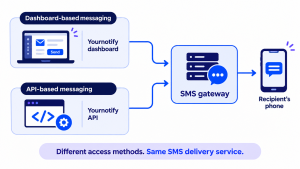
You can either manage your SMS campaigns through a dashboard or integrate messaging into your applications using an API.
What Is a Bulk SMS API?
A bulk SMS API allows you to connect your business website, mobile application, or internal software to an SMS gateway and send messages directly from those systems.
The API provides a defined way for two software applications to communicate and exchange information.
With an SMS API, you do not have to log in to a messaging dashboard every time you need to send a text. The application submits a request to the SMS gateway containing the recipient’s phone number, sender details, and message content. The gateway then processes the request and returns a response indicating whether it has been accepted for processing.
This makes API-based messaging useful for businesses that need SMS to form part of their everyday operations. For example, a bank that triggers a debit alert after a transaction, or a clinic that sends appointment reminders from its booking system,
Unlike dashboard-based messaging, which requires a user to initiate each campaign, API integration allows you to incorporate SMS into your existing processes. Once the integration is set up, messages are triggered automatically based on the rules and activities configured within the application.
How Does an SMS Gateway Work?
An SMS gateway processes messages sent from an application and routes them through mobile networks to the intended recipients. This involves receiving the message request, checking its details, forwarding it for delivery, and returning status information to the originating application.
The process typically involves five steps:
- Your application triggers a message. A customer completes a transaction, creates an account, or books an appointment. Based on that action, the application determines what SMS needs to be sent and prepares the recipient’s phone number, sender details, and message content.
- The application sends a request through the SMS API. The application communicates with the provider’s SMS gateway by sending a structured request to its API endpoint. The request contains the message details and the required authentication credentials, which allow the provider to verify that the request is coming from an authorised application.
- The gateway validates and processes the request. The gateway checks the authentication credentials, recipient details, message format, and other applicable requirements. Depending on the provider, it may also check the account balance and calculate the number of SMS segments required. If the request fails validation, the API returns an error response. If it passes, the message is accepted for processing and queued for delivery.
- The message is routed through the mobile network. The gateway forwards the message through an available route to the recipient’s mobile network. Factors such as network availability, sender ID approval, message type, and applicable Do-Not-Disturb (DND) restrictions can affect delivery.
- The gateway returns delivery information. Once the network processes the message, delivery status information may be sent back to the gateway. Depending on the provider’s capabilities, businesses can access these updates through dashboard reports, API responses, or webhooks. Statuses may indicate whether a message was delivered, failed, or is still pending.
This process allows you to send messages automatically from your existing systems and monitor your delivery automatically.
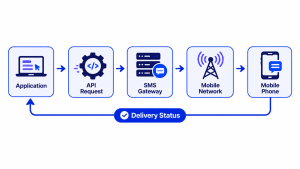
How a message travels from your application to a customer’s phone.
What to Look for When Choosing an SMS Gateway Provider in Nigeria
An SMS gateway provider may have API access, network coverage, and competitive rates, but these details alone do not tell you how well the service will perform. Before choosing a provider, evaluate its technical capabilities, delivery performance, compliance support, and pricing.
The following factors can help you assess your options.
1. API documentation and ease of integration
The quality of a provider’s API documentation determines how easily your developers can connect your application to its messaging service. Look for current endpoint references, request and response examples, supported programming languages, authentication instructions, and clear explanations of error codes.
Documentation should also explain how to test requests without sending live messages.
What to ask: Can a developer complete a basic integration using the documentation alone, and is there a way to test requests before sending live messages?
2. Network coverage and delivery performance
If you are sending SMS in Nigeria, network coverage should include subscribers on MTN, Airtel, Glo, and 9mobile. However, a provider listing these networks does not automatically guarantee consistent delivery across all of them.
Delivery varies depending on the recipient’s network, phone status, message content, and available routes. Ask for network-specific delivery information and, where possible, run a controlled test using numbers on different networks.
For additional guidance, read how to improve SMS delivery rates in Nigeria.
What to ask: Can the provider report delivery performance by network, and how does it respond when a delivery route experiences problems?
3. Delivery reports and message tracking
A provider should give you a way to monitor what happens after a message is submitted. Look for message-level statuses, such as queued, sent, delivered, and failed, as well as failure information where available.
For API integrations, check whether delivery events can be sent directly to your application through webhooks. This allows your system to respond to delivery updates without requiring someone to check a dashboard manually.
Also find out how long delivery records are retained and whether you can retrieve historical reports.
What to ask: Can my application receive delivery updates automatically, and what information is included when a message fails?
4. Sender ID registration and management
A sender ID is the name or identifier displayed as the sender of an SMS. Businesses commonly use their brand name so recipients can recognise who sent the message.
In Nigeria, sender IDs are subject to registration and approval requirements. The NCC’s draft framework for licensing international A2P messaging addresses sender ID requirements for licensed aggregators. You should therefore confirm the applicable registration process with your SMS provider before launching campaigns.
A provider should explain the documentation required, guide you through the submission process, and clarify whether you can register and manage multiple sender IDs.
What to ask: Who handles sender ID registration, what information is required, how long does approval typically take, and can I use different approved IDs for different types of messages?
5. DND compliance and message routing
Nigeria’s Do-Not-Disturb (DND) service gives subscribers control over unsolicited marketing communications. Subscribers can text STOP to 2442 to activate DND or use the service’s category options to manage the messages they receive.
For businesses, this makes it important to understand how an SMS provider handles promotional and transactional traffic. Promotional messages may be restricted for subscribers who have activated DND, while qualifying service-related messages may be treated differently under applicable network rules.
Ensure not to misclassify promotional messages as transactional to bypass these restrictions. The NCC’s DND consumer information explains the service, while section 36 of the Nigeria Data Protection Act 2023 provides individuals with the right to object to the use of their personal data for direct marketing.
What to ask: How does the provider distinguish promotional traffic from transactional messages, and how does it handle messages to numbers on the DND service?
6. Pricing, message segmentation and transparency
SMS pricing is usually calculated by the number of message units sent, rather than simply by the number of recipients. This is because a long message may be divided into multiple SMS segments, with each segment billed separately.
For standard GSM-7 text, a single SMS can contain up to 160 characters. Longer messages are split into segments of up to 153 characters each. Messages containing emojis or characters outside the GSM-7 character set use Unicode encoding, which allows up to 70 characters in one SMS or 67 characters per segment when split.
This means a 200-character GSM-7 message will use two SMS segments, while a message containing Unicode characters may require more. Before launching a campaign, use an SMS character and segment calculator to estimate the number of units your message will consume.
You should also understand how the provider handles failed messages, unused credits, credit expiry, and currency fluctuations. If you are operating in Nigeria, confirm whether rates are charged in naira or another currency.
What to ask: How are message segments calculated, are failed messages charged, and what happens to unused credits?
7. Security and API authentication
An SMS API can be used to send messages to your customers and consume your account credits. Its credentials should therefore be protected carefully.
Look for secure API authentication, HTTPS connections, and clear processes for creating, rotating, and revoking API keys. If the provider supports webhooks, check whether webhook requests are signed so your application can verify that incoming events genuinely originated from the provider.
Your development team should also store API keys securely on the server rather than exposing them in browser code, mobile applications, or public repositories.
What to ask: Can API keys be rotated or revoked when necessary, and does the provider support webhook signature verification?
8. Reliability and technical support
A delayed OTP or transaction alert can affect a customer’s experience, so provider reliability matters beyond the initial integration. Find out how the provider handles service interruptions, delivery route failures, and API downtime.
Check whether it publishes service updates, provides a clear support channel, and has an escalation process for urgent issues. If the provider offers service-level commitments, review what they cover and how performance is measured.
Your own integration should also account for temporary failures. For example, if a request times out, your application should check whether the message was already accepted before retrying it. Otherwise, the same message could be sent more than once.
What to ask: What support is available when delivery performance drops, and what safeguards can help prevent duplicate messages?
How to Integrate a Bulk SMS API into Your Application
Integrating a bulk SMS API involves connecting your website, mobile application, or internal software to an SMS provider so messages can be sent directly from your system. Although the general process is similar across providers, the API endpoints, authentication methods, and request formats may differ.
The steps below use Yournotify as an example. For the exact technical specifications, refer to the developer documentation and SMS API page.
Step 1: Create an account with an SMS gateway provider
Start by creating an account with your chosen SMS gateway provider and completing any required verification. If the service operates on a prepaid basis, you will also need to fund your account before sending live messages.
For a business application, decide who will manage the account, monitor usage, fund the messaging balance, and handle technical access. These responsibilities should remain with authorised members of your organisation and not depend entirely on an external developer.
Step 2: Generate your API credentials
API credentials allow your application to authenticate with the SMS provider. In Yournotify, you can create and revoke API keys from Dashboard → Developer → API Keys.
Your application uses the API key to authenticate its requests. Yournotify’s API uses Bearer token authentication, meaning the key is included in the request’s authorisation header.
You can also verify that an API key is valid using Yournotify’s authentication endpoint, as documented in its API reference.
Keep your API key on the server and store it securely. Do not expose it in browser code, mobile applications or publicly accessible repositories.
Step 3: Register and activate a sender ID
Before sending messages, set up an approved sender ID. This is the name or identifier recipients see when they receive an SMS from your business.
In Yournotify, sender IDs can be submitted through the dashboard under SenderID → SMS. Choose an identity that customers can recognise and provide any supporting information required during registration.
Allow time for review and activation before planning your first campaign. If your application will send both promotional and transactional messages, confirm which sender ID arrangements are required for each type of traffic.
Step 4: Review the API documentation
Before writing code, read the provider’s API documentation to understand how requests are structured and how your application should handle responses.
For Yournotify, the SMS documentation covers operations such as creating and managing campaigns, retrieving campaign information, checking failed messages, retrying failed sends, and accessing SMS analytics. It also provides references for managing contacts and saved lists.
Pay particular attention to:
- The API endpoint and request method required to submit an SMS.
- The required fields for the sender, message content, and recipients.
- Authentication requirements and possible error responses.
- How to retrieve campaign and delivery information.
- How to handle failed messages and retries.
Yournotify also supports SMPP integration, which may be suitable for businesses that require protocol-level connectivity.
Step 5: Connect your application to the SMS API
Once you understand the request format, your developer can configure the application to communicate with the provider’s API endpoint.
This involves connecting to the appropriate endpoint, authenticating the request, and supplying the required message information. Depending on the intended use, your application may send messages to individual recipients or target an existing contact list.
For example, an online store could connect its order management system to the SMS API so that customers receive order updates automatically. A fintech application could integrate SMS into its transaction workflow to send account notifications.
The exact implementation depends on the provider’s API specifications and the structure of your application. Refer to Yournotify SMS API documentation for the current endpoints, supported request parameters, and implementation instructions.
Step 6: Test the integration before going live
Before sending messages to customers, test the integration to confirm that authentication, request formatting, and the required fields are correctly configured.
Start with the testing options provided in your SMS gateway’s documentation. Once the initial checks are successful, carry out a controlled live test using numbers your team can access.
Test across different Nigerian mobile networks and check that the sender ID, message content, and delivery reports behave as expected.
Also test how your application handles invalid numbers, missing fields, insufficient account balance, and other possible errors. These checks can help identify integration problems before they affect customers.
Step 7: Monitor delivery and handle errors
Submitting an SMS request is only one part of the process. Your application should also keep track of what happens after the provider accepts it.
Start by checking the API response and storing the relevant campaign or message reference. Handle validation, authentication, and account errors explicitly so that your system does not treat an unsuccessful request as a completed send.
You can then monitor campaign analytics and failure information through the SMS API. Yournotify also supports webhooks, which allow supported delivery, contact, and campaign events to be sent to your application or other connected systems.
One important consideration is how your application handles retries. A request may time out even when the provider has already accepted it. Sending the same request again without checking its status could result in duplicate messages. Your developer should therefore implement appropriate safeguards to prevent repeated sends.
With the integration properly configured, your application can trigger SMS messages based on customer activities, retain delivery information, and handle messaging as part of its existing business processes.
Why Businesses Use Yournotify for SMS Marketing
Yournotify is a growth marketing platform that helps businesses acquire, engage, and retain customers. Its SMS capabilities support both campaign-based messaging and automated communication through software integrations.
For businesses evaluating an SMS gateway provider in Nigeria, here are some of the capabilities available through Yournotify:
- Bulk SMS campaigns: Create campaigns using saved contact lists and segments, personalise messages, schedule sends, and monitor campaign results from the dashboard.
- Contact management: Import and organise customer contacts into reusable lists and segments to manage audiences across campaigns more easily.
- Sender ID management: Submit and manage sender IDs for use in SMS campaigns, with visibility into their approval status.
- Campaign reporting and delivery tracking: Monitor campaign activity, review delivery statuses, and access failure information to understand what happened to submitted messages.
- API and SMPP integration: Connect your existing applications and business systems to Yournotify’s messaging infrastructure through its REST API or SMPP integration. Webhooks can also send supported campaign, contact, and delivery events back to your systems.
- Usage-based SMS credits: Fund your messaging balance separately and pay for the SMS units you use. Yournotify provides SMS rates in naira, making it easier for Nigerian businesses to estimate messaging costs.
SMS also works alongside the other channels available on Yournotify. Because customer contacts and campaign activity can be managed within the same platform, you can also coordinate SMS with email and WhatsApp communication rather than treating every channel as a separate activity. The channel and timing of each message should still reflect the customer’s preferences and applicable consent.
You can see how this worked for one of our esteemed customers here: Creditville SMS marketing case study.
If you want to explore the service, visit Yournotify SMS, review the SMS API documentation, or create an account to get started.
Frequently Asked Questions About SMS Gateways and APIs
What is an SMS gateway in Nigeria?
An SMS gateway in Nigeria connects business applications and software to mobile networks, allowing them to send text messages to subscribers without establishing separate connections with individual network operators. The provider handles message processing and routing, and may also provide delivery reports and other messaging tools.
What is the difference between an SMS gateway and an SMS API?
An SMS gateway provides the infrastructure that processes and routes messages to mobile networks. An SMS API is the interface developers use to connect their software to that infrastructure and submit messaging requests. In simple terms, the gateway handles message routing, while the API allows an application to communicate with it.
How does a bulk SMS API work?
A bulk SMS API allows an application to send an authenticated request containing the sender details, message content, and recipient information to an SMS gateway. The gateway validates the request and, if accepted, processes it for delivery through the relevant mobile network. The application can then retrieve delivery information through reports or supported webhooks.
Can I integrate an SMS API into my website or application?
Yes. A website, mobile application or business system can integrate an SMS API if it can make the required authenticated requests to the provider’s endpoint. Developers typically use the provider’s API documentation to configure authentication, submit messages, and handle responses. API credentials should be stored securely on the server rather than exposed in front-end code.
How much does an SMS API cost in Nigeria?
The cost depends on the provider’s rate per SMS unit, the number of recipients, and the number of segments used by each message. Longer messages may be split into multiple segments, with each segment billed separately.
For example, if a provider charges ₦7 per SMS unit, sending 1,000 one-unit messages would cost ₦7,000, excluding any additional applicable charges.
Can an SMS API send messages across MTN, Airtel, Glo and 9mobile?
An SMS gateway with coverage across Nigeria’s major mobile networks can route messages to subscribers on MTN, Airtel, Glo and mobile. However, delivery performance may vary by network and route. Before choosing a provider, confirm its current network coverage and test delivery using numbers on each network.
How do I track SMS delivery?
You can track SMS delivery through the provider’s dashboard, API reports, or supported webhooks. Depending on the provider, statuses may include queued, sent, delivered, and failed, with additional failure information where available.
Remember that a successful API response generally confirms that the provider accepted the request for processing. It does not necessarily mean the message has reached the recipient’s phone.
What do I need to start using an SMS API?
You generally need an account with an SMS gateway provider, API credentials, an approved sender ID, sufficient messaging credit, and an application or system that can make authenticated API requests. For promotional messages, you also need an appropriate basis for contacting recipients, including any required consent. A developer will usually handle the technical integration using the provider’s documentation.
Is an SMS gateway suitable for small businesses?
Yes. Small businesses can use a bulk SMS dashboard to send customer updates and promotional campaigns without writing code. As their operations grow, they can integrate an SMS API with their websites, booking systems, or applications to automate messages such as payment confirmations, appointment reminders and order updates. This allows them to start with the messaging tools they need and expand their use of SMS as their processes develop.
Related Guide:
- SMS API Explained: What To Know Before You Choose A Provider
- Nigeria Bulk SMS Marketing and SMS API Guide