Email newsletters for bloggers and content creators turn occasional readers into an audience you can reach consistently. Use Yournotify to capture signups, welcome subscribers, send useful editions and connect each message to a clear next action.
This guide takes you from that promise to a working Yournotify newsletter: a signup form, an organised audience, a welcome message, a reusable design and a simple measurement plan. It suits writers, educators, podcasters, reviewers and creators building an audience in Nigeria or across several countries.
Table of Contents
Plan email newsletters for bloggers around a clear promise
“Join my newsletter” describes your activity. “Get one practical budgeting worksheet every Friday” describes a benefit. Write the promise before you design the form.
Choose one reader, one recurring problem and one useful format. A food creator could send a weekly meal plan; a career blogger could explain one application skill; a design educator could share an annotated project breakdown. The promise should match content you can produce consistently, including during busy weeks.
Writing expert Ann Handley’s Total Annarchy newsletter makes its voice, subject matter and delivery rhythm explicit. The useful lesson is to make subscribing feel like joining an identifiable relationship. Your own version needs a voice readers recognise and an expectation you can fulfil.
| Creator type | Reader need | Newsletter promise | Natural next offer |
|---|---|---|---|
| Career blogger | Improve an application | One practical CV or interview lesson | Workshop or coaching session |
| Food creator | Make weekday cooking easier | A meal plan with a shopping checklist | Recipe collection or class |
| Technology reviewer | Make a buying decision | A clear comparison with use cases | Relevant guide or disclosed sponsorship |
| Professional educator | Learn a specific skill | A worked example and practice task | Course or membership |
Start with the row closest to your existing work. Avoid promising a daily newsletter because a larger publication sends daily. Frequency should reflect your production capacity and the reader’s need.
Build a subscriber journey, not just a signup box
Your basic journey is relevant content → signup promise → useful welcome → regular newsletter → appropriate next action. Each stage should make sense on its own.
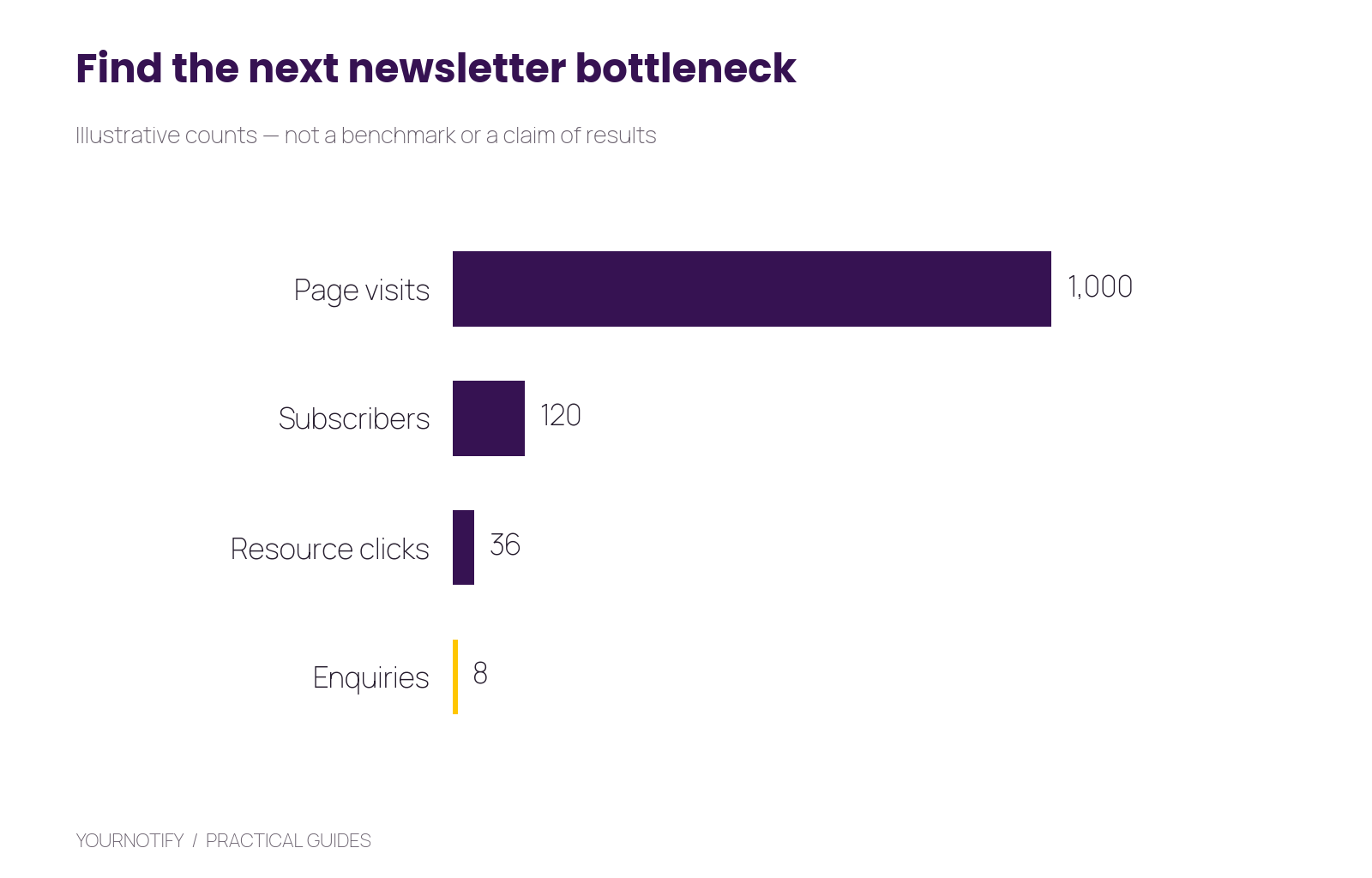
Illustrative planning example, not a market benchmark: 1,000 signup-page visits lead to 120 subscribers, 36 resource clicks and eight enquiries. The same counts are explained below so the chart is usable without the image.
In that example, the signup rate is 12%, the subscriber-to-resource-click rate is 30% and the subscriber-to-enquiry rate is about 6.7%. These are different questions. Low signup conversion suggests an offer or page problem; useful clicks without enquiries may suggest the paid offer is poorly matched or premature.
For a Nigerian audience, state the relevant currency when introducing a paid offer, use mobile-friendly pages and show live-session times clearly. Keep the learning content useful for readers elsewhere when your audience is international.
Step 1: create your audience and signup form
First, in Yournotify, create a clearly named list such as Career newsletter subscribers. Use contact attributes for information that genuinely changes your content, such as interest, signup_source and experience_stage. A list organises subscribers; attributes support more relevant contact segmentation.
Open Forms, create the signup form and connect it to the intended list. Begin with email and an optional name. Add an interest choice only if you will use it. Asking for occupation, telephone, city and company size without a reason can make a simple subscription feel like an application.
Example signup copy:
Get better at your next application. Every Friday, receive one practical CV or interview lesson, with examples you can adapt. Enter your email to join. You can unsubscribe whenever you want.
Use the hosted link or embed supplied by Yournotify Forms. Place it next to relevant articles, in your profile links and at the end of useful videos. Explain the newsletter benefit instead of repeating an unexplained signup link everywhere.
Test a new submission and confirm the destination list, attribute values and success message. If you offer a download, test its delivery separately from subscribing.
Step 2: prepare your sender and welcome message
Next, set up your domain and approved email sender in Yournotify. Follow the generated DNS instructions rather than copying another sender’s records. Google’s sender requirements cover authentication and delivery practices; getting this foundation right helps your newsletter arrive with a recognisable identity.
Use a From name readers connect with your content. A personal creator can use their own professional name; a publication can use its publication name. Keep a monitored reply address.
The welcome message should deliver the promise, set expectations and invite one useful response:
Subject: Your first application checklist is here
Thanks for joining. Start with the checklist below, then look out for one practical lesson each Friday. What is the hardest part of applying for your next role: your CV, finding suitable roles or interviews? Reply with the one you want help with.
Create the welcome workflow in Automations using the supported enrollment route for your form or subscription integration. Confirm how that form enrolls a contact; creating a list alone is not proof that a welcome automation will run. Test one new signup and one repeated submission.
Step 3: build a newsletter you can reuse
Then, use the Yournotify email editor to create a restrained template with a recognisable opening, one main lesson, a practical example and one primary action. Save it so future issues start from a consistent layout.
| Section | What to write | Example |
|---|---|---|
| Subject | The specific value of this issue | “Turn a vague CV bullet into evidence” |
| Opening | A situation the reader recognises | “You did the work, but the bullet still sounds generic.” |
| Lesson | One useful explanation | Show the difference between a duty and a result |
| Example | Something the reader can adapt | A before-and-after bullet with placeholders |
| Action | One small next step | Rewrite one bullet or download the worksheet |
Keep essential words as text rather than placing the entire email inside an image. Check mobile spacing, image alt text, the plain-text version and every link. A beautiful preview is not enough if the worksheet button opens the wrong file.
Step 4: plan four issues before you launch
After that, build a short editorial plan around one audience problem. For a career creator, the first month could cover choosing suitable roles, improving a CV, writing a focused application and preparing for an interview.
Give each issue a different job. The first can explain a problem, the second demonstrate a method, the third answer reader questions and the fourth invite readers to a relevant workshop. This produces a coherent sequence without turning every issue into a sales pitch.
Use the same campaign naming pattern: Career newsletter | 2026-12-04 | CV evidence. Add consistent UTM values to your links. Keep the original topic and source with the campaign so later reports are understandable.
For a broader commercial journey, connect this plan to the Nigerian creator monetisation funnel. This article focuses on the operating routine that makes the newsletter sustainable; the funnel guide explains how content can lead to a paid relationship.
Step 5: introduce offers at the right point
Next, a newsletter can support course sales, consulting, sponsorships, memberships or events. Choose an offer that extends what readers already find useful. A paid workshop on the topic readers keep asking about is easier to explain than an unrelated product.
Segment an invitation using declared interests or relevant confirmed activity. Do not assume every click means purchase intent, and do not describe every subscriber as a qualified lead. Give readers a clear page with the price, outcome, format and next step.
If you use sponsorships or affiliate links, describe the relationship clearly. Keep the editorial recommendation useful on its own. Avoid making the subscription valuable only when somebody buys something.
Measure the newsletter’s contribution
Review delivery failures, unique clicks, useful replies, unsubscribes and the action each issue was meant to support. Opens can be affected by mailbox behaviour, so avoid using them as your only measure of interest.
In the chart’s example, eight enquiries from 120 subscribers is a useful signal to investigate. Read the enquiries: are they relevant, and did the article answer the audience’s actual questions? A larger count of unsuitable enquiries may create work without improving the business.
Keep a simple issue log containing topic, audience, main link, replies, completed actions and what you learned. Change one major element at a time so the next issue teaches you something. For technical delivery questions, use the Email API and SMTP guide.
A practical first-month checklist
- Write the reader promise and prepare four issue ideas.
- Set up the list, form, sender and welcome message.
- Test signup, repeated submission, mobile rendering and unsubscribe.
- Publish the signup invitation alongside your most relevant content.
- Send the first issue and review actual replies and completed actions.
- Improve the next issue using one finding rather than redesigning everything.
Frequently asked questions
How often should a creator send a newsletter?
Choose a rhythm you can maintain and explain it at signup. Weekly or fortnightly can be sensible starting experiments, but the right frequency depends on the content and reader feedback.
Do I need thousands of subscribers before selling something?
No fixed audience size guarantees a sale. A small group with a clear need can give useful feedback and enquiries. Validate the offer and delivery process before increasing promotion.
Should every subscriber receive the same email?
A shared core issue is practical at the beginning. Use segments when differences in interest, location or stage justify genuinely different content.
Should I move followers into my email list automatically?
Invite them to subscribe through a clear form. A social follow and an email subscription are different choices.
Create your first newsletter journey
Open Yournotify and build one complete path from signup to a useful welcome email. Start with Yournotify Email, then use the creator newsletter playbook for additional editorial ideas. The first goal is a newsletter readers understand, recognise and want to receive again.