CRM for marketing agencies connects organised contact data with relevant client campaigns. In Yournotify, use consistent fields, meaningful segments and a clear handover process so the team knows who to contact, why and what happens after a reply.
This guide explains how to organise contact data, build meaningful segments and operate a repeatable campaign process in Yournotify. It is intended for agencies managing acquisition, engagement and retention work for clients, with particular attention to clean handovers and measurable outcomes.
Table of Contents
Define the role of CRM for marketing agencies
Agree who owns the client account, data, sender identity, content approval and customer response. Campaign execution and business follow-up may belong to different people. If a campaign creates qualified enquiries, someone must be ready to handle them.
Keep client data and authorised access separated in the account structure appropriate to your arrangement. A list name alone is not a permission boundary. Do not combine unrelated client audiences just because the agency operates both campaigns.
| Responsibility | Decision to record | Practical benefit |
|---|---|---|
| Data ownership | Which client system owns the contact record? | Avoids conflicting updates |
| Field definitions | What does each stage or attribute mean? | Makes segments repeatable |
| Approval | Who signs off audience, copy and timing? | Prevents unclear launch responsibility |
| Response handling | Who follows up on enquiries or replies? | Connects campaigns to a useful outcome |
| Reporting | Which result will both teams recognise? | Reduces disputes about performance |
What segmentation specialists emphasise
Bain’s customer-segmentation guidance describes grouping customers by meaningful characteristics and adapting the offer or service to those groups. For an agency, the useful implication is that a segment should lead to a different decision, not merely a different label.
If two segments receive identical content, timing and follow-up, ask whether the distinction is useful. Start with differences the client can explain and maintain, such as service interest, customer stage or location.
Create a repeatable operating process
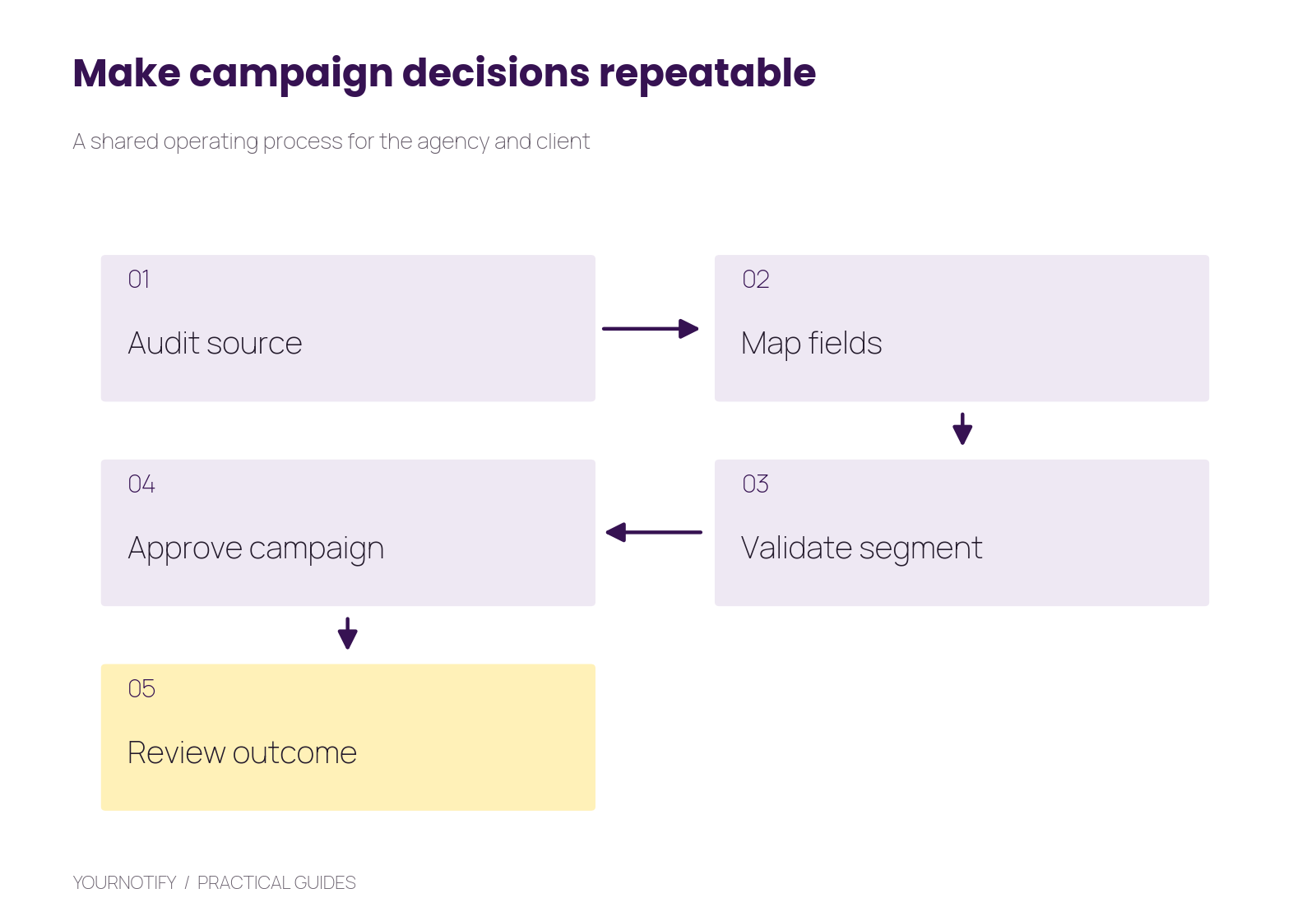
Suggested process: audit the source, map the fields, validate the segment, approve the campaign and review the outcome. Keep the same definitions across reporting periods.
This routine is especially useful when several staff members work on an account. A new campaign manager should be able to understand why an audience was selected without reconstructing months of private messages.
Step 1: audit a sample before importing everything
First, ask for a representative sample from each source: website enquiries, event registrations, existing customers and any connected business system. Check which fields are consistently populated, whether the contact details are usable and how communication preferences are recorded.
Review duplicate patterns. The same person may appear after a form submission, a purchase and an event registration. Define how those records should be matched before importing them as separate contacts.
Record the date and source of the sample. Do not call a database “clean” because one file imported successfully. A successful import means the system accepted the data; it does not prove the values reflect the customer’s current situation.
Step 2: agree a small field dictionary
Next, use fields that affect campaigns and follow-up. Keep names stable and define allowed values with the client.
| Field | Example values | Owner | Used for |
|---|---|---|---|
service_interest | Training, consulting, support | Form or client team | Relevant content |
relationship_stage | Enquiry, customer, inactive | Client system or responsible staff | Appropriate next action |
location | Agreed city or branch values | Contact record | Local information |
source | Website, event, referral | Acquisition process | Source analysis |
preferred_channel | The person’s recorded choice | Preference process | Channel selection |
Avoid free-text variations for a field that drives automation. If one file uses customer and another uses paid client, either map them deliberately or preserve a distinction the business actually needs.
Keep historical actions as events where appropriate. A single last_campaign field repeatedly overwritten by different systems is a poor substitute for an event history.
Step 3: organise lists and build useful segments
Then, use contact lists for stable groupings such as a particular event or import destination. Use segmentation for conditions that should reflect current data.
For a training client, useful segments might include enquiries interested in a specific programme, confirmed registrants needing preparation details and existing customers eligible for a relevant next course. Build the conditions using fields and activity actually available in the account.
Before a campaign, inspect examples of contacts that should match and contacts that should not. Check empty values and people with more than one relationship to the client. A segment that looks correct by count can still contain the wrong individuals.
The customer data and CRM guide explains contact creation, updates and identity management for integrated workflows.
Step 4: connect each segment to a message and action
After that, write a short campaign brief for each materially different audience. Include the audience rule, the reason for the message, the primary action and the team responsible for responses.
Enquiry segment
You asked about our weekend programme. Here is the schedule and a worked example of what participants will practise. Request a discussion if you need help deciding whether it fits your goals.
Confirmed registrant segment
Your programme begins on Saturday at 10am WAT. Please review the preparation checklist and arrival details before attending.
Relevant existing-customer segment
The next course builds on the topic you previously studied. Review the content and prerequisites before deciding whether it is the right next step.
These messages perform different jobs. Do not send an acquisition offer to a confirmed registrant simply because the same promotional template is convenient.
Use Yournotify Email, SMS or WhatsApp where the message and recipient preferences justify it. Preview personalisation and missing fields before approval.
Step 5: document approval and run the campaign
Next, keep the approved audience definition, copy, sender, links, timing and expected follow-up together. A client should be able to review the actual message and destination page, not an abstract promise to “increase engagement”.
Check the final audience count shortly before sending. Dynamic conditions can change between planning and launch. If a campaign depends on a live status such as confirmed registration, make sure the source updates are current.
Use a predictable naming convention that includes the client or account context, purpose and date. Keep campaign references with the report so another team member can locate the evidence.
Step 6: report outcomes by segment
Finally, report both delivery and the business action. A client who wants consultations needs to see confirmed consultations, not only clicks. When the client owns the final outcome, agree a dependable way to return that information.
Suppose an illustrative campaign has 300 eligible enquiries, 45 request a consultation and 18 attend. The request rate is 15%; attendance among requests is 40%. Investigate scheduling and follow-up before concluding that the campaign audience was the only problem.
| Reporting layer | Evidence | Typical owner |
|---|---|---|
| Audience | Final selection and exclusions | Agency and client data owner |
| Delivery | Accepted, delivered and failed results | Campaign operator |
| Engagement | Relevant unique interactions and replies | Agency |
| Outcome | Confirmed booking, attendance or completed signup | Client operational system |
| Learning | What to change next | Agency and client together |
Use the attribution guide where campaign interactions need to connect with supported outcomes. Keep the goal definition and reporting window consistent when comparing segments.
Make the handover part of the service
Keep a short operating document covering fields, audience rules, active workflows, owners and unresolved issues. Review it whenever an integration or offer changes. Good documentation protects the client from a campaign process that only one person understands.
At the end of each reporting cycle, identify one useful improvement: a missing source field, an unclear offer, a slow response process or a segment that needs to be narrowed. Prioritise the issue most likely to improve the actual outcome.
For agencies building the wider service, the agency growth guide provides related business context.
Frequently asked questions
Should an agency create a new list for every campaign?
Not automatically. Use stable lists where they help organisation and segments for changing conditions. Repeated audience copies can become difficult to maintain.
Is demographic segmentation enough?
Often the person’s need, relationship stage or declared interest is more directly useful. Choose data that changes the message and that the client can maintain accurately.
Can the CRM replace the client’s operational system?
Define the role of each system. Yournotify can support contact organisation and communication while another system owns bookings, payments or fulfilment.
What should be checked before every send?
The audience definition, current count, sender, copy, personalisation, links, timing and response ownership. Test the final message rather than relying on an earlier version.
Build a more dependable agency campaign process
Open Yournotify Contacts, agree the client’s field dictionary and validate one useful segment. Connect that segment to a relevant message and a measurable next action before expanding the account’s campaign programme.