Email marketing for event planners helps people decide to attend, register and arrive prepared. Pair detailed emails with concise SMS reminders in Yournotify, then follow up according to whether the recipient registered, attended or requested more information.
This guide shows event planners how to build that process with Yournotify, from audience setup and registration capture to reminders and post-event follow-up. It works for conferences, training days, exhibitions, professional gatherings and community events in Nigeria.
Table of Contents
Plan email marketing for event planners across the attendee journey
Someone considering a ticket needs a reason to attend. A registered attendee needs accurate preparation details. Speakers, exhibitors and volunteers need instructions connected to their roles. Do not send all three groups the same campaign.
| Audience | Main need | Email role | SMS role |
|---|---|---|---|
| Prospective attendees | Decide whether the event fits | Programme, benefits and registration information | A relevant concise invitation where appropriate |
| Registered attendees | Prepare and arrive | Confirmation, schedule and arrival details | Short reminder or important update |
| Speakers and exhibitors | Fulfil a specific role | Briefing, requirements and contacts | Time-sensitive coordination |
| Attended guests | Continue the useful relationship | Resources, feedback and next steps | A specific agreed follow-up when justified |
Create a reliable registration state and keep audience membership current. A ticket buyer should stop receiving “Finish registering” messages once the ticket is confirmed.
A useful reference from TEDx organisers
TED’s guide to inviting and engaging attendees distinguishes logistical communication for registered attendees from broader community newsletters. It also recommends planning communication before, during and after the event.
Apply that distinction to your own event by giving each audience a separate information checklist. Your campaign calendar should reflect the attendee’s stage, not simply the organiser’s desire to send another announcement.
Map the event communication timeline
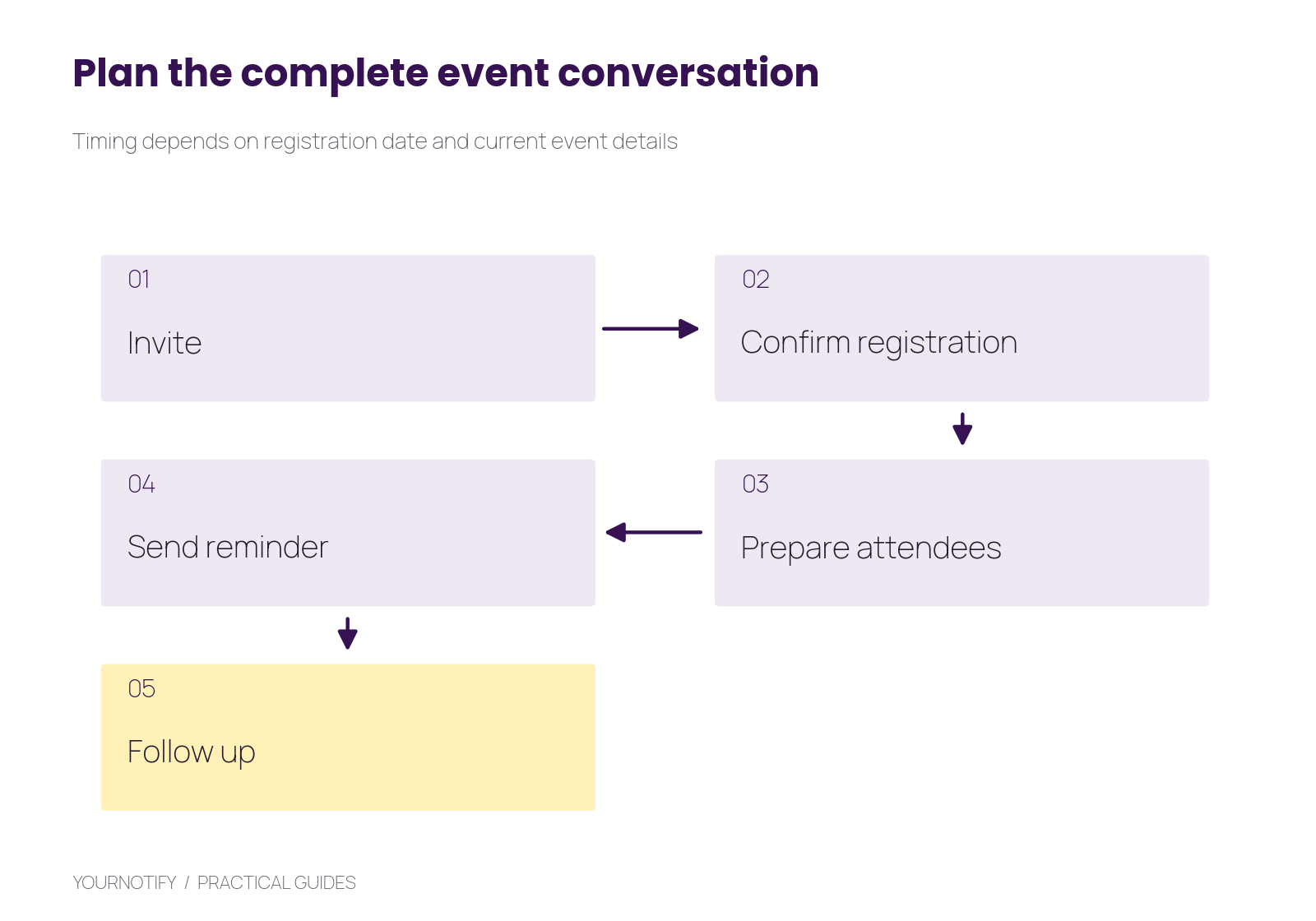
Suggested timing: invitation during promotion, confirmation after registration, preparation information before the event, a short final reminder and relevant follow-up afterwards. Adjust the intervals for late registrations and event changes.
The sequence is conditional. A person registering the day before needs the latest preparation details, not a replay of every message sent during the previous month. A cancelled event requires a different communication path entirely.
Step 1: create the registration and audience structure
Use an event-specific list and clear attributes such as event reference, ticket or attendance type, registration status and preferred communication channel. Keep your ticketing or registration system as the source of truth for confirmed places and capacity.
Yournotify Forms can capture interest or registration information. When payment or ticket allocation happens elsewhere, connect the confirmed result before sending a message that promises admission. A submitted form is not automatically a paid ticket.
Collect only the details needed to run the event and communicate appropriately. Explain any optional newsletter subscription separately from essential event updates. Keep access requirements available to the team that needs to act on them rather than exposing them in general campaign data.
Test registration with a new contact, an existing contact and someone submitting twice. Decide how your process prevents duplicate confirmations and accidental overbooking.
Step 2: prepare the invitation page and email
Your event page should state who it is for, what attendees will gain, the format, date, time, location, price where applicable and the registration process. Include a working route for questions.
Use the Yournotify email editor to build a reusable event template. Keep one primary registration action and make the essential details readable as text. Do not hide the date and venue inside a poster image alone.
Example invitation:
Subject: A practical operations workshop for growing teams
Join us in Lagos for a focused session on documenting repeatable processes. You will work through a sample process and leave with a checklist to adapt. View the programme, date and registration details here: https://example.com/workshop
Use a specific benefit instead of filling the email with speaker names and adjectives. If a brand or speaker is involved, use the approved name and role accurately.
Step 3: write the confirmation and preparation messages
Confirmation should arrive after the relevant registration step succeeds. Include the attendee reference, what is confirmed, the event details and the next preparation step.
Confirmation email
Subject: Your place is confirmed — Example Workshop
Your registration reference is REG-1042. The workshop begins at 10am WAT on Saturday at the confirmed venue shown here: https://example.com/arrival. Please review the preparation checklist before attending.
Preparation email
Bring the example process you would like to improve. The programme and arrival instructions are available here: https://example.com/programme. Contact the event team if you need help planning your visit.
Final SMS reminder
Example Workshop: We look forward to seeing you tomorrow at 10am WAT. Check arrival details before travelling: https://example.com/arrival
Replace every example detail and use your actual confirmation process. Check links on a phone, including on a connection that is slower than the organiser’s office network.
Step 4: schedule and coordinate the team
Set the intended timezone and keep all campaign owners working from the same event calendar. For a Nigerian event, WAT or Africa/Lagos should be explicit in messages that may reach international attendees.
Assign an owner to each send and a backup for important updates. Agree who can approve a venue or time change. Check that the support team will be available when messages are likely to generate questions.
Use one authoritative details page and update it when logistics change. A short SMS can direct attendees there, but the message should still state the essential change clearly. Avoid sending “Important update” without explaining what changed.
Your SMS guide covers sender preparation, message parts and tracking. Estimate the cost of each planned send using actual recipients and the editor’s billable-part estimate.
Step 5: connect the right event and stop the wrong sequence
For automation, connect confirmed registration, cancellation and relevant attendance updates from the system that owns them. Keep repeat-entry rules clear so a duplicate registration event does not restart the entire sequence.
Build separate paths where the next action differs. A waitlisted person needs information about availability; a confirmed attendee needs arrival details; someone who cancelled needs the applicable confirmation of that change.
Do not use an email open as proof that an attendee read the venue change. For essential coordination, use a proportionate confirmation process and human follow-up where needed.
Step 6: follow up based on attendance and interest
After the event, reconcile attendance before choosing the follow-up. Attendees may need slides, resources or a feedback form. People who could not attend may appreciate available recordings or information about another suitable event.
Example attendee follow-up:
Thank you for joining Example Workshop. Here are the resources we discussed: https://example.com/resources. Which part was most useful, and what would you change for a future session? Share your feedback here: https://example.com/feedback
Keep promises realistic. Do not advertise a recording if it is not available for distribution. Use the person’s chosen communication preferences when inviting them into an ongoing newsletter.
Measure the event funnel and operating quality
Suppose 500 people register and 350 attend in an illustrative example. Attendance rate is 350 ÷ 500 × 100 = 70%. If 140 attendees complete feedback, the attendee response rate is 40%. These figures illustrate reporting, not an industry benchmark.
| Measure | What it helps explain | Useful follow-up |
|---|---|---|
| Registration conversion | Whether the offer and page work together | Review audience fit and form friction |
| Confirmed attendance | Whether registered people arrive | Review logistics, timing and expectations |
| Support questions | Whether essential details were clear | Improve the page and preparation message |
| Feedback completion | Whether you hear from attendees | Make the feedback request focused |
| Next agreed action | Whether the event supports its purpose | Follow up with the relevant team |
Keep ticket revenue, attendance and later business outcomes separate. An event can be well attended without generating the commercial outcome a sponsor expected, so agree the goal before launch.
Frequently asked questions
How many reminders should an event send?
Use the minimum sequence that helps people prepare. Registration timing, event complexity and prior communication matter more than a fixed universal count.
Should email and SMS contain the same content?
They can support the same action while doing different jobs. Email handles detail; SMS should remain concise and specific.
Can a free event still need confirmation?
Yes. Clear confirmation helps people understand whether they have a place and helps the organiser manage capacity.
Can I reuse the audience for another event?
Review relevance and communication preferences. Participation in one event does not explain every future promotional message.
Build a complete event communication plan
Explore Yournotify for events and the existing event email-marketing guide. Prepare your registration states, message calendar and response ownership, then open Yournotify to build and test the first event journey.