Lead generation for consultants and coaches should produce relevant conversations and booked sessions. Yournotify helps you connect a focused offer, enquiry form and follow-up sequence so prospective clients understand your service and its next step.
This guide shows how to build that process with Yournotify Forms, contact attributes, follow-up and measurement. It suits business consultants, professional trainers, career coaches and specialist service providers who need to turn interest into booked consultations while protecting time for delivery.
Table of Contents
Define the offer behind lead generation for consultants
Start with the situation that makes someone seek help. “Leadership coaching” is a category. “Help a first-time manager run clear weekly meetings” describes a specific need. A focused offer makes your page, form and follow-up easier to write.
The Christensen Institute’s Jobs to Be Done framework examines the progress people seek in particular circumstances. Use that lens when interviewing prospective clients: ask what changed, what they have tried and what a useful outcome would look like.
For a Nigerian consultant working with local and international clients, clarify the delivery format and time commitment. An in-person workshop in Lagos, a remote advisory session and a six-week coaching programme need different qualification questions.
| Professional | Specific audience problem | Useful first offer | Next step |
|---|---|---|---|
| Business consultant | A founder needs a clearer operating process | A focused diagnostic worksheet | Scoping conversation |
| Career coach | A candidate is struggling with interviews | A practice checklist | Introductory coaching session |
| Leadership trainer | A team needs consistent meeting habits | A meeting review framework | Team-training discussion |
| Creative consultant | A business needs a clearer brief | A project-brief template | Project-fit call |
Choose one offer first. A library of ten unrelated downloads can attract an audience without making your expertise or paid service any clearer.
Design a manageable qualification funnel
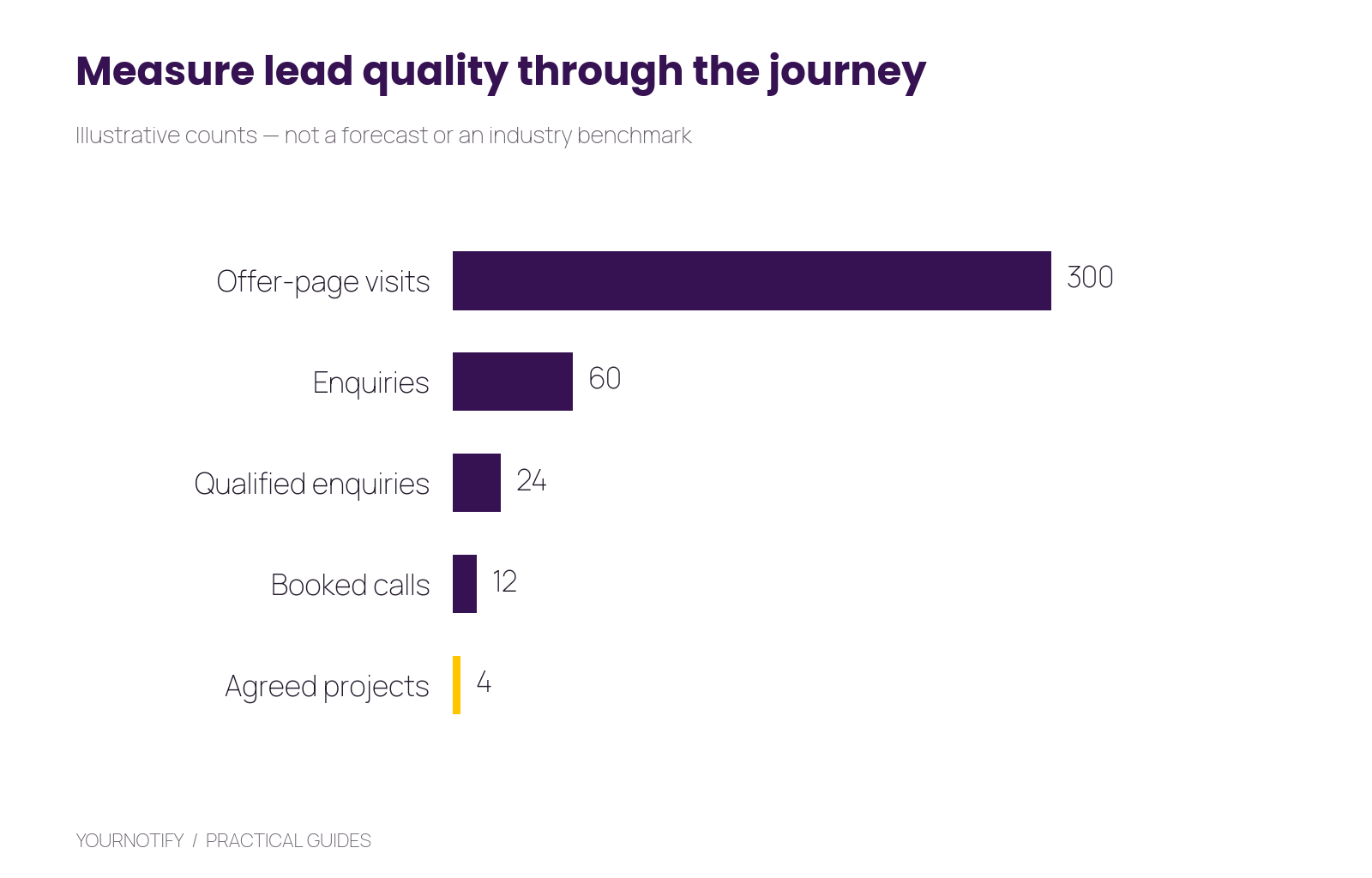
Illustrative planning example, not a sales benchmark: 300 visits produce 60 enquiries, 24 qualified enquiries, 12 booked calls and four agreed projects.
The example has a 20% visitor-to-enquiry rate and a 40% enquiry qualification rate. Twelve booked calls from 24 qualified enquiries means half reach that stage. Four projects from 12 calls is about 33%. Diagnose each transition rather than treating the final project count as a verdict on every part of the process.
Define qualification in terms of service fit, readiness and your ability to help. A high-value enquiry is not always the person who fills out the longest form.
Step 1: create a focused offer page
Your page should answer five questions: whom the offer helps, what problem it addresses, what the person receives, what is required of them and what happens next.
Use a practical example of the deliverable. A project-brief worksheet can show the questions it helps a business resolve. A coaching introduction can explain the session’s scope and format. Avoid promising a job offer, business result or transformation you cannot control.
Keep the primary action consistent. If the page offers a worksheet, deliver the worksheet before pressuring the person to book a call. If it offers a consultation, explain whether the booking is immediate or subject to a fit review.
Use real experience and permitted client evidence where available. A clearly described process is more persuasive than an unsupported claim to be the best consultant in a market.
Step 2: build the enquiry form in Yournotify
Create a form for the specific offer and select its destination list. Add only fields that help with delivery or qualification. For an introductory consulting enquiry, name, email, area of interest and a short description of the challenge may be enough to start.
| Field | Useful question | How you will use it |
|---|---|---|
| Service interest | Which area do you want help with? | Route to the right offer |
| Current challenge | What is the main issue you want to resolve? | Prepare a relevant first response |
| Timescale | When are you hoping to begin? | Prioritise and set expectations |
| Delivery preference | Remote or in person? | Check whether you can serve the request |
Make the success message explicit: “We have received your enquiry. You will receive the requested worksheet by email. If you requested a consultation, our team will review the details and explain the next step.” Only promise a response time your process can support.
Use Yournotify Forms for a hosted or embedded form. Test the full submission, list mapping and confirmation before promoting it.
Step 3: organise the contact and source
Use stable attributes such as service_interest, lead_stage, source and preferred_format. Keep campaign names consistent across links so you can distinguish a webinar enquiry from a referral or article signup.
Create a clear stage vocabulary: new enquiry, reviewing fit, invited to book, booked, proposal sent and closed. Use only stages your team can maintain. Update the record when the situation changes so follow-up does not keep restarting.
The contact data and segmentation guide explains how to organise attributes and audiences. Keep notes that need human interpretation separate from structured fields used in workflow rules.
Step 4: prepare a helpful follow-up sequence
Start with three purposeful messages, then adjust based on replies and progress.
First email: deliver the requested resource
Subject: Your project-brief worksheet
Here is the worksheet you requested: https://example.com/brief. Start with the section on the result you need. If you would like help applying it, reply with the part you find hardest to clarify.
Next, demonstrate the approach
A common challenge is describing activities without agreeing the outcome. Try rewriting one task as a result your team can recognise. Here is a short worked example: https://example.com/example
Finally, offer the appropriate conversation
If your team is ready to work through the brief, you can request a scoping call here: https://example.com/consultation. The page explains the format and what to prepare.
Space messages according to the offer and reader expectations. Stop the invitation sequence when the person books, declines or changes preferences. A human reply should be reviewed by a person rather than ignored while the next automated message continues.
Step 5: make booking and preparation clear
Use your actual scheduling process or booking tool to confirm appointments. A form requesting a preferred slot is not itself proof of a confirmed booking. Once confirmed, record the booking state and send the date, timezone, meeting details and preparation instructions.
For international clients, write the timezone explicitly and check calendar behaviour. For in-person work, include the location and any relevant arrival instructions. Keep the consultation’s scope clear so people understand what the conversation will cover.
Before the call, review the original enquiry and source. Ask follow-up questions that build on what the person already shared, rather than asking them to repeat the entire form.
Step 6: measure quality and capacity
Track enquiries, qualified enquiries, bookings, attended calls and agreed work. Record why an enquiry was unsuitable: wrong service, unsupported location, unrealistic timing or another meaningful reason. Those patterns can improve the page and offer.
If you spend an illustrative ₦120,000 on a campaign that produces 24 qualified enquiries, cost per qualified enquiry is ₦5,000. If it produces 12 booked calls, cost per booked call is ₦10,000. These are planning calculations; they do not establish profitability without delivery costs and actual project outcomes.
Review your available appointment capacity before increasing promotion. If you cannot respond to the next 30 enquiries properly, improve the process or reduce the campaign’s scope first.
Use the attribution guide to distinguish source interactions from confirmed lead and appointment outcomes. For API-based capture, follow the forms and tracking guide.
A two-week launch plan
During the first week, define the offer, write the page, build the form and prepare the resource and acknowledgement. Test with people who resemble your intended audience and ask what they expect to happen after submitting.
During the second week, share the offer through the channels where your expertise is already relevant. Review real enquiries daily, correct unclear questions and record the first booked conversations. Expand based on what you learn, not merely on the number of form views.
Frequently asked questions
Do I need a free resource?
No. A clear consultation or project-enquiry offer may be more suitable. Use a resource when it helps the audience make progress and demonstrates the kind of help you provide.
Should I ask for a budget on the first form?
Ask only if it meaningfully affects the next step. Explain what the information is for and avoid making the form unnecessarily difficult for someone still defining their project.
Can follow-up be automated?
Yes, where the trigger, eligibility and stopping rules are clear. Keep fit assessment and substantive personal replies with the appropriate person.
What is the most useful first metric?
Qualified enquiries reaching a completed conversation is a practical starting measure. Define both qualification and completion before comparing campaigns.
Build a lead process that respects your time
Open Yournotify and create one offer-specific form, list and follow-up sequence. Explore Yournotify Leads to connect capture with organised contact data and useful next steps.