WhatsApp marketing for real estate agents turns property enquiries into useful conversations and viewing appointments. With Yournotify, organise buyer interests, send relevant property details and keep each follow-up tied to an agreed next step.
This guide shows agents and property sales teams how to organise enquiries, use approved WhatsApp templates, manage replies and measure confirmed appointments with Yournotify. It is designed for a practical Nigerian property workflow, including local buyers and people enquiring from abroad.
Table of Contents
Plan WhatsApp marketing for real estate agents around the enquiry
A first-time buyer researching locations, a renter seeking immediate availability and an overseas buyer planning a visit have different needs. Ask enough to make the next conversation useful, then let the agent qualify the enquiry.
| Information | Why it matters | Example value |
|---|---|---|
| Property or development interest | Prevents unrelated follow-up | A named development or listing reference |
| Location | Routes the enquiry correctly | Abuja or a specific Lagos area |
| Preferred next step | Distinguishes research from appointment intent | Brochure, call or viewing |
| Contact preference and timing | Makes a response more convenient | WhatsApp after 4pm WAT |
| Enquiry stage | Determines the next message | New enquiry, details sent, viewing requested or confirmed |
Avoid collecting sensitive financial documents through a general lead form. Use the appropriate later process when a transaction actually requires them. At the enquiry stage, your priority is understanding what the person needs and who should respond.
A Nigerian property example: Mixta Africa
Mixta Africa’s contact page distinguishes sales, customer-care and diaspora contact routes. The useful lesson is that an enquiry should reach the team equipped to help with its purpose.
Apply that principle in your own business. Store location, interest and enquiry stage with the contact, and assign responsibility before a campaign goes out. An agent handling an Abuja development should not have to discover the location after several generic messages.
For an overseas prospect, state the timezone when discussing a viewing or call. Offer a realistic next step, such as arranging a discussion with the responsible team, rather than assuming the person can visit the next morning.
Map the enquiry-to-viewing journey
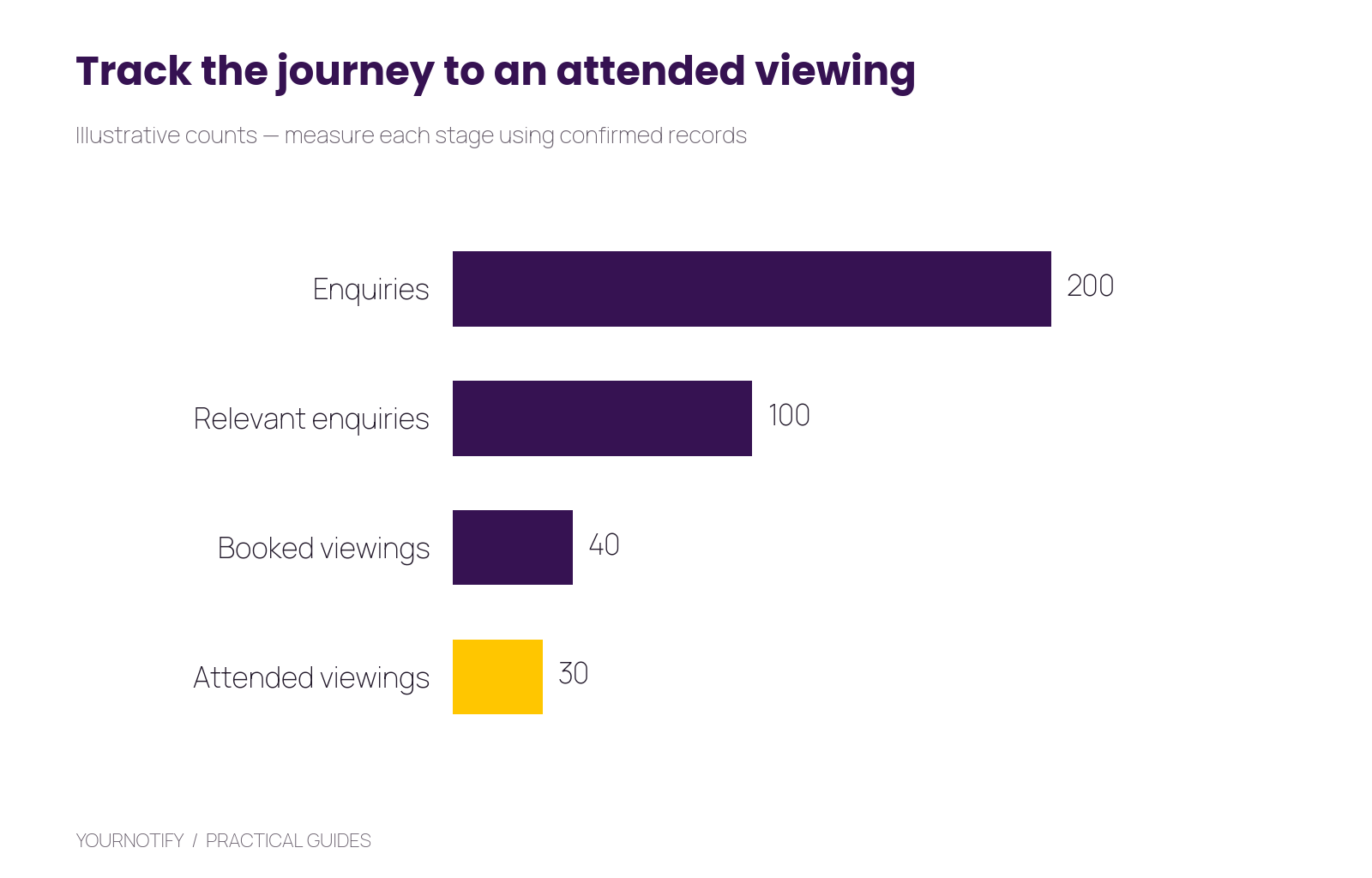
Illustrative example, not a performance benchmark: 200 enquiries become 100 relevant enquiries, 40 confirmed viewings and 30 attended viewings. A request and a confirmed appointment are recorded separately.
In this example, 50% of enquiries meet the team’s agreed criteria. Forty per cent of those relevant enquiries book a viewing, and 75% of bookings attend. The biggest opportunity might be better qualification, easier scheduling or clearer arrival instructions; the graph helps you identify which question to investigate.
Define “relevant enquiry” before using that measure. It might mean the person is interested in a property type and location you can actually serve. It should not simply mean someone clicked a brochure link.
Step 1: capture enquiries into an organised audience
First, use a dedicated lead form for a development or a clearly named property enquiry form. Explain the next step and collect the information your team will use. Map the submission to the right contact list and attributes.
If your existing website already captures the enquiry, connect its backend to the documented contact and event routes. Preserve the listing reference and the original source. The lead-generation API guide explains the separation between storing a contact and recording an action.
Use one stable contact identity as the enquiry progresses. Someone asking about a second property should not automatically become a duplicate person with a disconnected conversation history.
Step 2: prepare the sender and templates
Next, set up your approved WhatsApp sender in Yournotify and create templates for the actual message purpose. A relevant offer to an opted-in prospect and a confirmation of an agreed appointment are different messages; choose the appropriate template category.
Keep variable positions predictable. An appointment template might need a name, reference, date, time and meeting point. Preview the entire message with realistic values before using it in a campaign. Do not insert an unrelated promotion into an operational template simply because the template is already approved.
Use a recognisable business identity and working contact details. In property transactions, clarity about who is speaking and what action is being requested is especially important.
Step 3: write messages that move the conversation forward
Then, these examples show message intent and wording. Adapt them to your approved templates and actual property details.
After a requested brochure
Hello Ada, here are the details you requested for Example Gardens: https://example.com/gardens. Would you prefer to discuss the property first or request a viewing?
After an appointment is confirmed
Your Example Gardens viewing is confirmed for Saturday at 11am WAT. Your reference is VIEW-104. The meeting point and contact details are here: https://example.com/viewing
When a prospect needs time
Thank you for reviewing the information. Which detail would help your decision most: location, availability or the viewing process? Our team can help with that next step.
After a completed viewing
Thank you for visiting Example Gardens. We have recorded the questions you raised. Your agent will send the agreed information through this conversation.
Use verified current details for availability, prices and terms. Do not create urgency around a property unless the underlying information supports it. A specific, accurate answer is more valuable than a message packed with unsupported claims.
Step 4: connect messages with human follow-up
Yournotify Conversations gives your team a place to manage the customer conversation alongside your messaging process. Decide who owns each enquiry, what happens outside office hours and when another colleague should take over.
Keep an agent’s response tied to the contact’s latest need. If someone has already booked, answer the appointment question rather than restarting the introduction. If they ask to stop receiving offers, update the relevant communication preferences.
For a small team, a daily review can cover new enquiries without an owner, requested viewings awaiting confirmation and conversations requiring a specialist answer. Resolve those queues before increasing campaign volume.
Step 5: use automation for reliable follow-up
After that, begin with a short workflow: enquiry received, acknowledgement, assigned follow-up and the appropriate next-stage message. Connect the event or status that confirms an appointment before automating the confirmation.
Add a reminder only when it helps the appointment. Stop or change it when the viewing is cancelled or rescheduled. Your booking system or team must provide the changed state; a workflow cannot infer it from an unrecorded telephone conversation.
Use the marketing automation guide to connect triggers and stopping rules. Keep one-off agent conversations available for situations that need judgement.
Step 6: measure outcomes by property and source
Next, report enquiries, relevant enquiries, confirmed viewings, attendance and the later outcomes recorded by your business. Keep the property reference and source so one popular listing does not hide weak results elsewhere.
| Question | Useful evidence | Possible next action |
|---|---|---|
| Are enquiries relevant? | Location and property fit | Improve the offer page or audience |
| Are people booking? | Relevant enquiry to confirmed viewing | Simplify the booking conversation |
| Are people attending? | Confirmed booking to attendance | Improve directions and reminder timing |
| Are agents keeping up? | Unowned or unresolved enquiries | Adjust staffing and responsibility |
For campaign measurement, use the conversion-tracking guide. Attribute a confirmed booking from the system that knows it happened, and keep sales or revenue analysis grounded in transaction records.
Launch with one development first
Select one listing or development, define the eligible audience and prepare the brochure, template and response process. Test with colleagues acting as a local prospect, an overseas prospect and a person rescheduling a viewing.
Confirm that everyone sees the correct timezone, location and responsible contact. Review the first real enquiries before expanding to more properties. The goal is a repeatable process your agents can operate, not the largest possible contact list.
Frequently asked questions
Can I send property offers to every telephone number I have?
Use an appropriate audience that expects the relevant messages. A number collected for an unrelated service does not explain why the person should receive property promotions.
Is a brochure click a qualified lead?
It is an interaction. Qualification needs the agreed information or conversation that establishes whether you can serve the enquiry.
Should appointment requests be counted as bookings?
Keep them separate until the appointment is confirmed. This makes reminders and attendance reporting more reliable.
Can SMS support this workflow too?
Yes, where it fits the recipient’s preference and message purpose. See the existing real-estate SMS guide for complementary examples.
Build a more useful property conversation
Start with Yournotify WhatsApp, one property-specific audience and one clear appointment journey. Open your dashboard to prepare the form, sender, template and follow-up process together.