Bulk voice marketing gives Nigerian businesses a way to deliver messages customers can hear, even when they are not reading email, browsing WhatsApp, or actively using an app. Yournotify supports dashboard campaigns and programmable Voice API delivery for both promotional and transactional calls, with text-to-speech or hosted audio, lists and segments, scheduling, interactive keypad responses, inbound call handling, testing, and analytics.
Voice should not replace every other channel. It is strongest when urgency, accessibility, explanation, or interaction makes a call more useful than a short written notification. Use email for detail, SMS for concise mobile reach, WhatsApp for rich conversations, push for active app users, and voice for customer moments that benefit from being heard.
The practical rule: call only people who expect the communication, identify the business immediately, keep the purpose clear, and provide a useful next action.
Table of Contents
What is bulk voice marketing?
Bulk voice marketing is the controlled delivery of a recorded or text-to-speech call to a permission-based audience. Unlike manual calling, a campaign platform can select a sender, target a list or segment, personalise the script, schedule delivery, collect keypad responses, and report outcomes across many recipients. Promotional uses include launches, offers, event reminders, surveys, and reactivation. Transactional uses include payment alerts, appointment reminders, delivery updates, service disruption notices, verification, and urgent account communication.
Voice campaign platform versus Voice API
| Method | Best for | How it works in Yournotify |
|---|---|---|
| Dashboard campaign | Marketing, operations, scheduled broadcasts, surveys, and segmented outreach | Choose a Voice SenderID, write or attach the content, select a list or segment, test, schedule, and submit |
| Voice API | Product events, transaction alerts, workflow automation, and individual calls | Send one transactional call or create a promotional campaign from an authenticated application request |
| Inbound voice | Customer self-service and interactive response journeys | Configure a voice number, prompt, keypad choices, and follow-up actions for incoming calls |
Promotional and transactional voice calls
| Call type | Appropriate purpose | Example |
|---|---|---|
| Promotional | Consented offers, launches, event invitations, surveys, and win-back campaigns | A 25-second call announces a weekend offer and invites the customer to press 1 for an SMS link. |
| Transactional | Information tied to an existing account, order, booking, payment, or service | A call confirms an appointment time and lets the customer press 1 to confirm or 2 to reschedule. |
| Urgent operational | Time-sensitive service or security notices where a call adds value | A service interruption message explains the affected location and expected restoration time. |
Do not hide an advertisement inside a transactional call. Keep each call focused on the purpose the customer expects. Nigeria’s data-protection framework gives people the right to object to direct marketing, so teams should document consent, maintain suppression records, and stop promotional processing after an objection.
Step 1: request and activate a Voice SenderID
Open SenderID → Voice → Create in Yournotify. Confirm the country and requested voice number type, then submit the request. The dashboard explains that voice sending remains unavailable until the assigned number is activated. Plan this setup before a time-sensitive campaign, and use a number and caller identity appropriate for the business and intended traffic.
- Use a customer-facing identity your audience can recognise.
- Separate promotional and transactional requirements when your configuration or provider requires it.
- Confirm the active sender appears in the Voice composer before scheduling a campaign.
- Document ownership, approved use cases, escalation contacts, and campaign operating hours.
Step 2: choose text-to-speech or hosted audio
Yournotify supports two practical content modes. Text-to-speech turns the campaign script into spoken audio and is useful for personalised or frequently changing messages. Hosted audio uses a public HTTPS audio URL and is useful when a consistent human recording, pronunciation, tone, or brand voice matters.
- Text-to-speech: write short sentences, use punctuation for natural pauses, spell unusual terms phonetically where necessary, and test names, amounts, dates, and Nigerian place names.
- Hosted audio: record in a quiet environment, normalise volume, remove long silence, use an accessible file URL, and keep the final call concise.
- Personalisation: use customer variables only when the underlying profile data is accurate and the spoken result has been tested.
- Language: use language your audience understands and avoid switching languages without a clear reason.
Step 3: select a permission-based audience
The Voice composer can target saved lists, dynamic segments, or a controlled pasted audience. Store telephone numbers in international format, deduplicate contacts, remove invalid records, suppress people who objected, and confirm the selected group expects the call. Segments are especially useful for transactional eligibility or targeted promotional campaigns because membership can change with customer data.
Step 4: create, test, and schedule a Voice campaign
Open Voice → Create. Add a clear internal campaign name, select the active Voice SenderID, prepare the message or audio, and choose the audience. The same screen provides optional scheduling and add-ons. Use the test action with an internal number before submitting a real campaign.
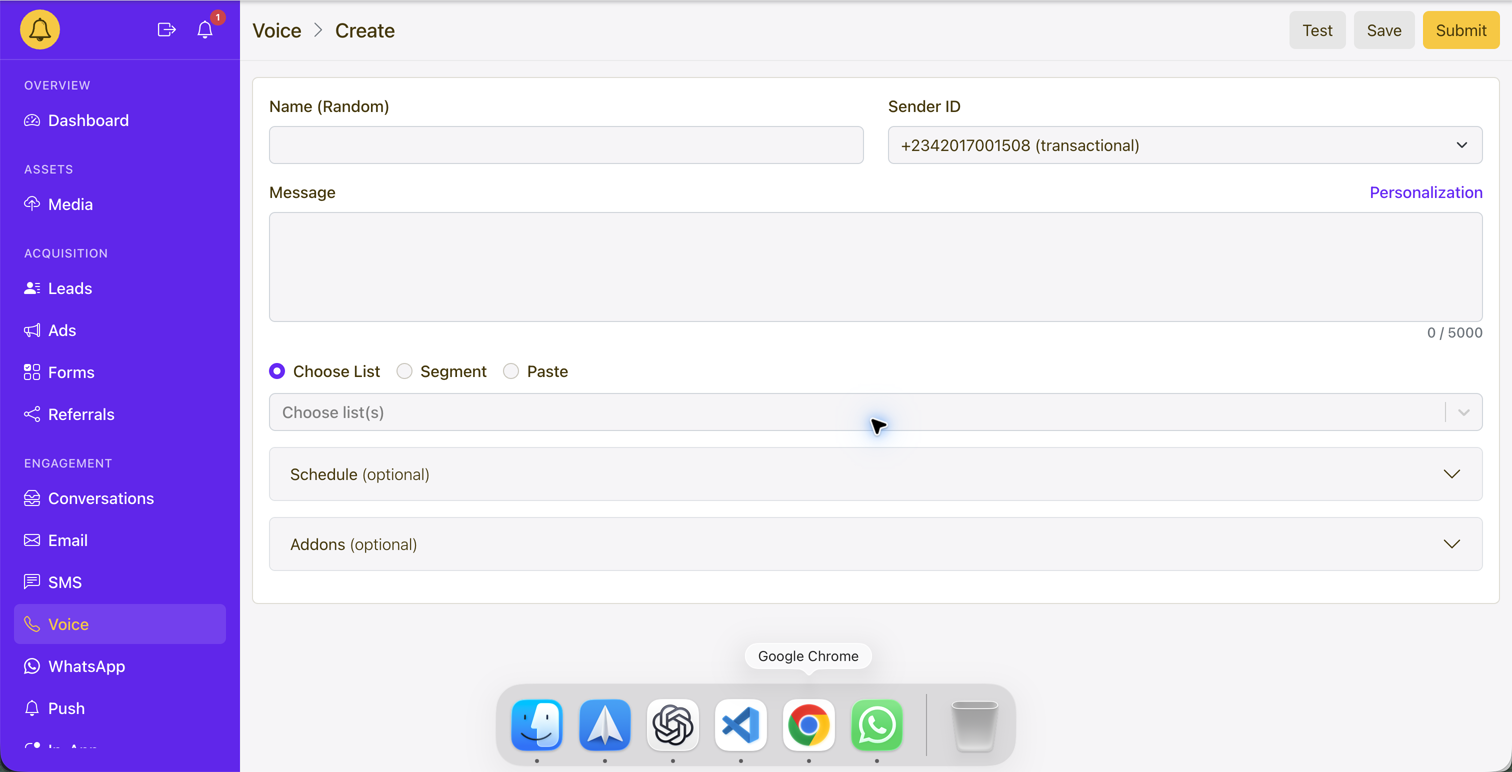
- Name: identify the purpose, audience, and date for the team.
- Sender ID: confirm the active number and traffic type.
- Message: identify the business in the opening seconds and state one clear purpose.
- Audience: preview the list or segment and confirm permission and eligibility.
- Schedule: use the correct timezone and avoid intrusive calling hours.
- Test: listen on a real phone, check pronunciation and volume, and exercise every keypad path.
- Save or Submit: save unfinished work; submit only after the content, audience, cost, timing, and response flow are approved.
Step 5: build interactive voice responses
Interactive voice response lets a recipient press a keypad number to choose what happens next. Yournotify’s response builder can branch to another voice prompt or continue through SMS, WhatsApp, or webhook actions. Keep the menu short, repeat the important options, include a safe fallback for invalid or missing input, and test every branch before launch.
| Keypad action | Useful next step | Example use case |
|---|---|---|
| Press 1 | Send an SMS or WhatsApp link | Customer requests the offer, payment, booking, or application link |
| Press 2 | Continue to another voice prompt | Customer chooses a language or asks for more information |
| Press 3 | Trigger a webhook or team workflow | Customer requests a call-back or support follow-up |
Step 6: monitor voice campaign analytics
A sent call is not the same as a successful customer outcome. Review the full delivery and response funnel. Yournotify supports campaign lists, analytics, exports, inbound reports, text or audio views, and interactive-response results.
| Metric | What it means | What to investigate |
|---|---|---|
| Queued / initiated | Calls accepted for processing | Funding, sender activation, scheduling, validation, or throughput |
| Ringing | The destination network is alerting the recipient | Calling hours, number quality, and customer expectation |
| Completed / answered | The call connected | Whether the customer heard enough of the message to act |
| Busy / no answer | The customer could not take the call | Retry policy, timing, frequency, and alternative channels |
| Failed | The call could not be completed | Invalid number, route, sender, provider, or account configuration |
| Duration | How long the connection lasted | Opening clarity, script length, audio quality, and drop-off |
| Keypad responses | What recipients selected | Menu clarity, intent, routing, and follow-up ownership |
| Conversion | The business action after the call | Landing page, sales handoff, payment, booking, or attribution |
Voice API workflow for developers
Yournotify’s Voice API supports transactional and promotional programmable calls through /campaigns/voice. A request can provide the approved sender, recipient or campaign audience, message or audio content, text-to-speech voice, scheduling, interactive response configuration, and a client request identifier. Use sandbox validation before creating records or placing calls, store the returned campaign ID, and retrieve analytics or listen for webhook events such as completed and failed call outcomes.
- Authenticate securely and never expose production API credentials in browser code.
- Use an idempotent client request identifier for product-triggered workflows.
- Validate telephone numbers, consent, sender availability, content, and cost before submission.
- Subscribe to Voice webhook events so downstream systems can react to completed, failed, or interactive outcomes.
- Log the business event and campaign ID without unnecessarily retaining sensitive call content.
High-value Nigerian voice campaign use cases
- Financial services: payment reminders, fraud education, repayment notices, service updates, and confirmation flows.
- Healthcare: appointment reminders, clinic changes, medication collection notices, and accessibility-focused updates without exposing unnecessary health data.
- Education: application deadlines, admission updates, fee reminders, class changes, and parent information.
- Logistics and travel: delivery exceptions, pickup readiness, itinerary disruption, booking confirmation, and driver or passenger coordination.
- Retail and ecommerce: consented launches, store events, loyalty milestones, order updates, and reactivation campaigns.
- Events and public services: attendance confirmation, time changes, emergency information, surveys, and interactive response collection.
Common mistakes to avoid
- Calling purchased, scraped, or unrelated numbers without a valid purpose and permission.
- Failing to identify the business and purpose in the opening seconds.
- Using a long script when one clear message and next step would perform better.
- Calling too early, too late, or too frequently.
- Publishing text-to-speech without testing pronunciation, pauses, names, amounts, and dates.
- Using low-volume or noisy recorded audio.
- Creating keypad branches without testing invalid input, no input, and downstream actions.
- Measuring only calls initiated instead of completions, duration, responses, conversions, objections, and complaints.
Frequently asked questions
Can Yournotify send both marketing and transactional voice calls?
Yes. The Voice campaign and API workflows support both, but teams should separate purposes, audiences, consent, content, sender requirements, and reporting so promotional calls are not disguised as transactional alerts.
Do I need to upload a recording?
No. You can use text-to-speech for a written script or provide a public HTTPS audio URL for a recorded message. Test the final audio on a real call before launch.
Can customers respond during the call?
Yes. Interactive response flows can collect keypad input and continue through another voice step, SMS, WhatsApp, or a webhook-driven workflow.
Can I make calls from my application?
Yes. Use the documented Voice API for product-triggered calls and campaign creation, then retrieve campaign analytics or receive call events through webhooks.
Ready to put the workflow into practice? The Voice campaign FAQs cover sender setup, audio, audience selection and reporting. Use the Calls setup guides when your team needs a live browser conversation with an individual contact.
Start voice campaigns with Yournotify
Yournotify combines activated voice senders, text-to-speech, hosted audio, lists, segments, scheduling, testing, interactive responses, inbound voice, analytics, exports, APIs, webhooks, and multichannel follow-up. Explore Yournotify Voice Marketing, read the API documentation, or open the Voice campaign builder.