Ecommerce marketing automation connects a confirmed customer event with a useful next message. Use Yournotify to follow up on purchases, share product-care advice and invite relevant repeat orders based on the customer’s stage and preferences.
For a Nigerian online seller, this means connecting the store, customer records and messaging process before building a long sequence. This guide shows how to plan and test that connection in Yournotify, with example workflows, messages and a measurement plan for repeat purchases.
Table of Contents
Plan ecommerce marketing automation by customer stage
Treat the journey as a series of states rather than a list of emails. A shopper waiting for an order needs different information from a satisfied customer considering another purchase. Someone with an unresolved complaint may need service, not another offer.
| Stage | Customer question | Useful communication | Source of truth |
|---|---|---|---|
| Order placed | Did my order go through? | Accurate order confirmation | Store order record |
| Payment confirmed | Was payment received? | Receipt or payment confirmation | Confirmed payment state |
| Fulfilment in progress | What happens next? | Relevant dispatch or collection information | Fulfilment system |
| Order received | How do I use or care for this? | Helpful instructions or support route | Confirmed delivery or collection |
| Ready for another purchase | What is useful next? | Relevant product or replenishment invitation | Customer context and permissions |
Do not collapse these into “customer purchased” if your store handles payment and fulfilment separately. This is particularly useful when orders can remain pending, be collected later or change after a support conversation.
A familiar example: Jumia’s purchase confirmation
JumiaPay’s Nigerian FAQ describes purchase email notifications after order and payment confirmation. The principle to apply is that a transactional message should reflect a confirmed business event.
For your store, use the actual payment or order status to decide what to say. A customer should not receive “Payment successful” because they merely opened a checkout page. Keep the reference visible so support can locate the transaction.
Build one complete post-purchase workflow
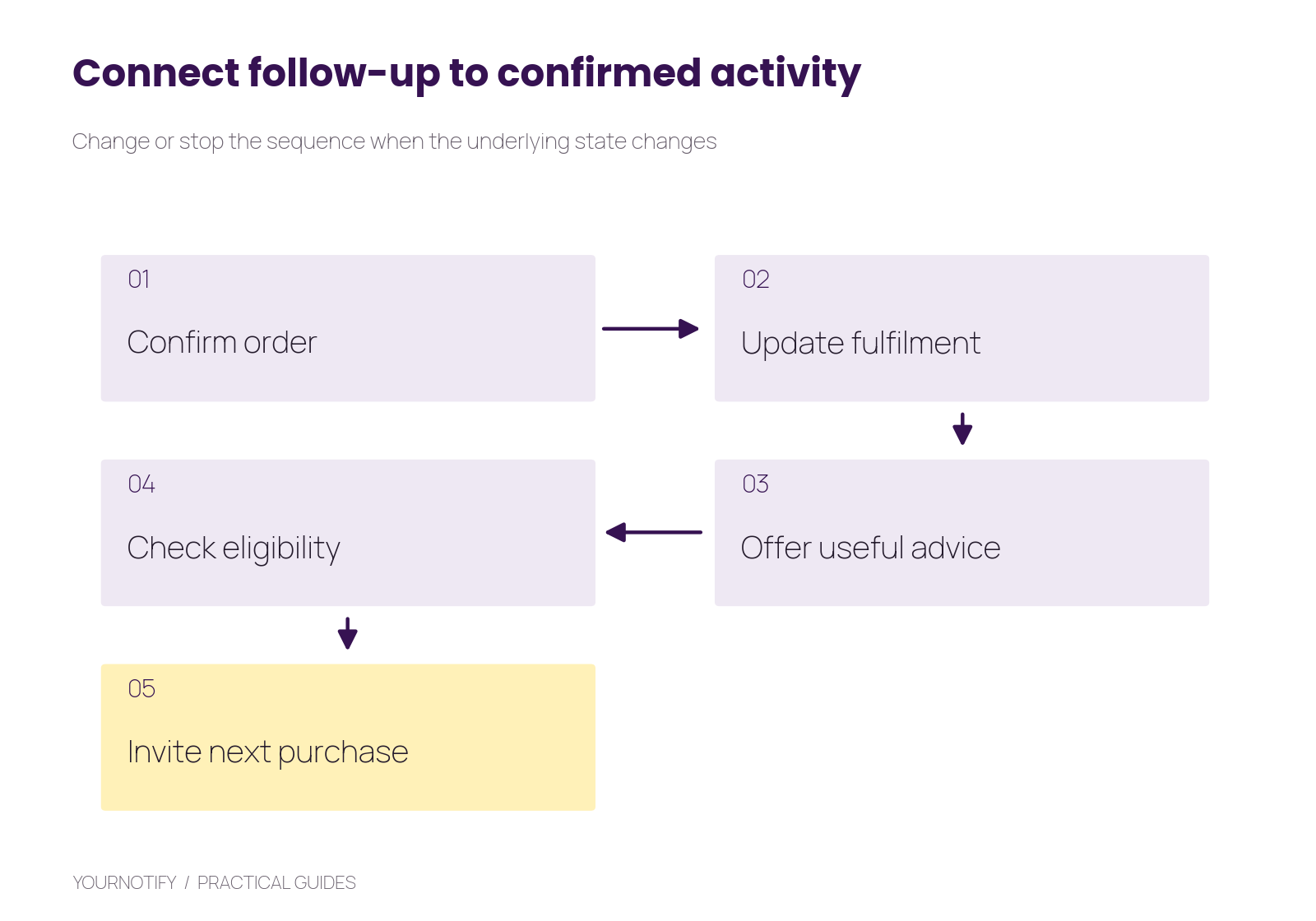
Suggested workflow: confirm the order, provide the appropriate fulfilment update, offer useful product guidance, check eligibility and send a relevant next-purchase invitation. Cancellations, complaints and changed preferences should alter the path.
Begin with one product category. A consumable may justify a replenishment reminder; a durable product may need setup advice and accessories. Copying the same seven-day reminder to both categories creates messages that are easy to automate but hard to justify.
Step 1: agree your event and customer data
Write a small event dictionary with the developer or store operator. Record which system supplies each event, what it means and which identifier prevents duplicates. An event such as order.created should mean the same thing every time it arrives.
Keep the customer ID, order reference, product category and relevant status available. Use one stable identity across repeat orders. Store only the data your workflow needs; messages should not expose private payment details.
Review the Yournotify integrations directory for the connection relevant to your store. Verify which events it actually supplies. Where your workflow needs an additional event, implement it through the documented server-side API and test the result before activation.
The marketing automation API guide explains identity, events and workflow testing. Your store remains responsible for confirming that a business event happened.
Step 2: organise customers for useful decisions
Create clear contact attributes, such as product_interest, preferred_channel and the customer stage needed by the workflow. Keep purchase and fulfilment facts in the systems that own them, then supply the values or events needed for segmentation and branching.
Use Yournotify contact lists for stable audiences and segments for conditions that change. Examples include a product-interest group or customers at the appropriate follow-up stage, where the required data is available.
Do not assume every buyer has agreed to ongoing promotions. Keep order communication and marketing eligibility distinct so a necessary receipt does not depend on joining a promotional list.
Step 3: prepare the message library
Write messages for the events you actually support. Keep a controlled template name and owner so staff know which version is active.
Order confirmation
Subject: We have received order EX-2041
Thank you for your order. You can review the items and current status here: https://example.com/orders. We will send the relevant update when the next step is confirmed.
Confirmed payment receipt
Your payment for order EX-2041 is confirmed. View your receipt and fulfilment details in your account. If you need help, contact us with this order reference.
Product-care message
Here are three ways to care for your new item, plus the support route if something is unclear: https://example.com/care
Repeat-purchase invitation
Ready to restock the product you selected? Review the current options and availability here: https://example.com/restock. Choose the quantity that suits you.
These are examples for a fictional store. For WhatsApp, adapt the message to the appropriate approved template. For email, use the Yournotify editor and test the actual product data, links and mobile layout.
Step 4: configure the workflow and stopping rules
Create a named automation and keep it inactive while building. Select the trigger, eligible audience, action and delay. Add the condition that decides whether the next message is still useful.
A simple replenishment workflow could begin after a confirmed purchase, wait an interval appropriate to that product and check whether a newer purchase or other relevant state makes the reminder unnecessary. The delay is a business decision to test, not a universal best-practice number.
Configure entry frequency and repeat-entry behaviour. A customer who buys two items in the same order should not accidentally enter identical journeys twice. Use stable event references for retries, and check how this workflow interacts with other campaigns.
Test cancellation, refund and complaint scenarios using the events or attributes your integration provides. If the system cannot observe a condition, build the missing connection or keep that decision in a manual review step.
Step 5: test with realistic orders
Use test contacts and an isolated test workflow. Check a successful order, a pending payment, a cancelled order, a repeated event and a customer who buys again before the reminder is due.
For each test, inspect the contact, event receipt, workflow state and final message. Confirm that references match and that the next action works. Test a missing optional field so the email does not display a broken greeting or empty product sentence.
For a Nigerian store serving customers abroad, keep currency and timezone explicit where they matter. A local delivery estimate should not be copied into an international-order template without checking the fulfilment process.
Step 6: measure retention without confusing it with message volume
Use a defined cohort and time window. For example, among 200 eligible first-time buyers in a worked scenario, 50 make a second purchase within 60 days. The repeat-purchase rate is 50 ÷ 200 × 100 = 25%. That example explains the calculation; it is not an expected result or proof that automation caused the purchases.
| Measure | Why it helps | What to keep consistent |
|---|---|---|
| Repeat-purchase rate | Shows whether a defined group returned | Cohort and observation period |
| Time to next purchase | Helps assess reminder timing | Product category and customer stage |
| Message failures | Reveals delivery or data problems | Channel and failure definition |
| Complaints and opt-outs | Helps assess relevance and frequency | Audience and campaign purpose |
| Contribution after incentives | Checks whether an offer is commercially useful | Costs, returns and reward treatment |
Compare suitable groups or run a controlled test when you need to estimate incremental impact. Revenue attached to a message is not automatically revenue created by the message.
Add loyalty after the basic journey works
Once order data and messaging are reliable, consider Yournotify Loyalty or Referrals. Define the qualifying event, benefit, limits and treatment of cancelled orders before activating incentives.
A relevant reward can strengthen an existing journey, but it does not fix inaccurate order states or repeated messages. Start with a programme your team can explain and reconcile.
Frequently asked questions
Should I start with abandoned-cart recovery?
Start with the event data you can confirm reliably. A post-purchase workflow is often easier to validate. Cart recovery needs a dependable cart event, contact identity, eligibility rules and a way to stop after purchase.
How long should I wait before a repeat-purchase message?
Use the product’s likely usage cycle and your own customer data. Test an appropriate interval and stop reminders when the underlying need changes.
Can I automate email, SMS and WhatsApp together?
Use each channel where it solves a clear need. Prepare senders, templates and recipient preferences, and avoid sending the same message through every channel by default.
Does a successful API response mean the order is complete?
No. Messaging acceptance and order completion are different states. The store supplies the business truth; delivery reporting describes the message.
Build your first ecommerce journey
Explore Yournotify for ecommerce and marketing automation. Connect one confirmed event, prepare one useful sequence and test every stopping rule before expanding to more products.