SMS marketing for schools helps admissions teams follow up with interested parents, while school updates keep existing families informed. Separate those audiences in Yournotify so each message supports the right next step.
This guide helps school owners, administrators and admissions teams build an SMS process in Yournotify. It covers audience organisation, message examples, sender setup, scheduling, follow-up and a practical reporting routine. The goal is to make school communication easier to act on and easier for staff to manage.
Table of Contents
Plan SMS marketing for schools and parent updates separately
Prospective families need information that helps them decide whether the school fits their needs. Current parents need relevant operational updates. Staff and volunteers need instructions connected to their responsibilities. Combining these audiences creates unnecessary messages and missed details.
| Audience | What they need | Useful message | Appropriate outcome |
|---|---|---|---|
| Prospective parents | A clear next admissions step | Open-day invitation | Registration or enquiry |
| Registered open-day visitors | Accurate logistics | Time, campus and arrival instructions | Confirmed attendance |
| Current parents or guardians | Updates relevant to their child or class | A specific timetable or meeting reminder | Acknowledgement or completed action |
| Staff and event volunteers | Operational coordination | A briefing or reporting-time reminder | Prepared attendance |
Create named lists for stable audiences and use attributes such as campus, intake and class where they are necessary. Review guardian contact records carefully: one household may have several children, and one learner may have more than one authorised guardian.
What education specialists recommend
The Education Endowment Foundation’s guidance on family communication emphasises personalised, positive communication connected to learning. It also highlights timing, accessibility and the risk of sending too many messages.
Apply that guidance to your own school by asking what the parent needs to know or do. A reminder should explain the useful action without shaming the recipient. Test wording with a few staff and parents before adding it to a recurring campaign.
For example, “Please review Friday’s reading activity with your child” is a more useful instruction than “Parents must be more involved”. Keep private learner details out of bulk messages and use the school’s appropriate individual communication process where detail is sensitive.
Design the admissions communication journey
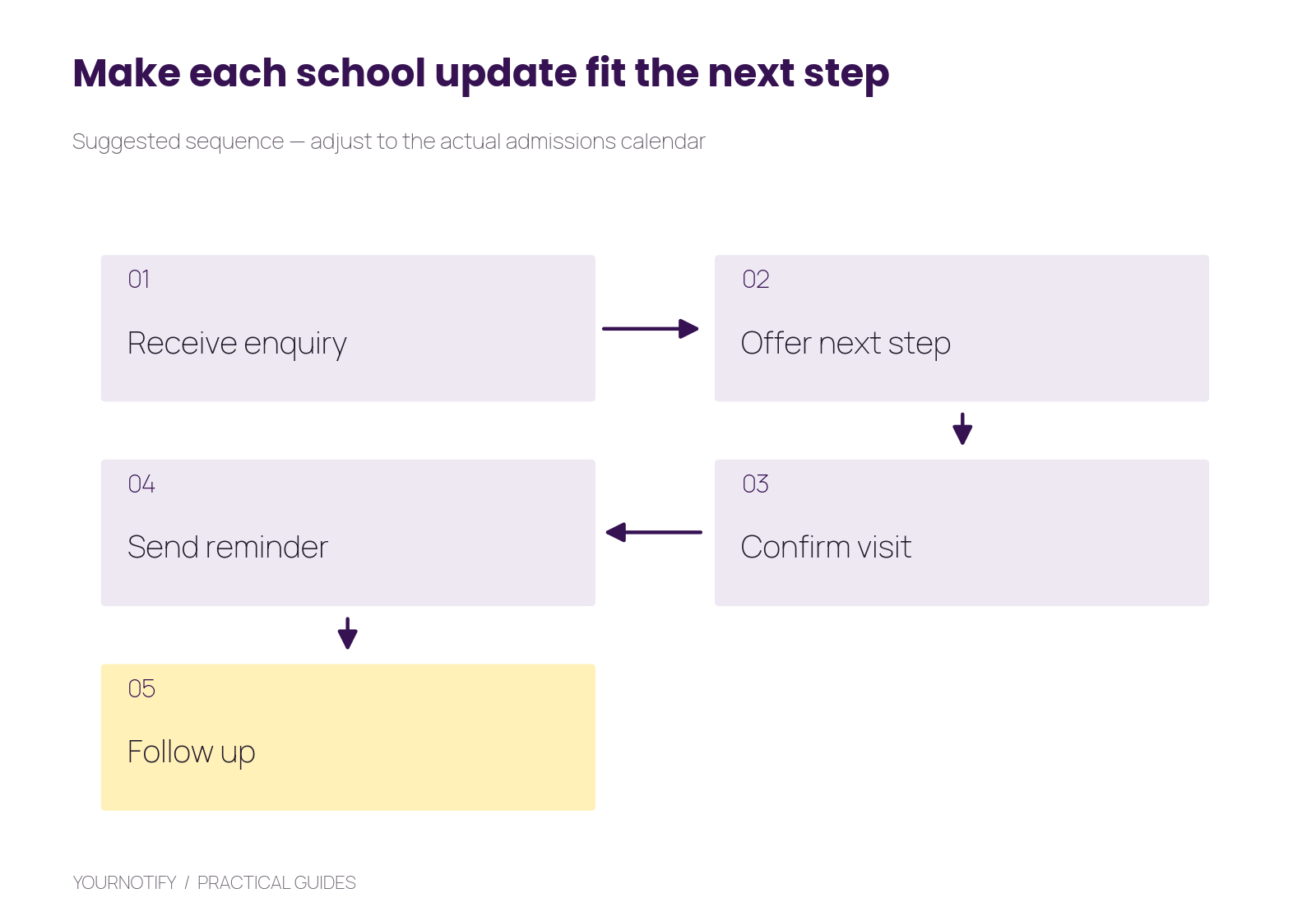
Suggested workflow: receive an enquiry, offer the next step, confirm the visit, send a timely reminder and follow up according to attendance. Timing should follow the school’s actual calendar.
Do not keep inviting a family to an open day they have already registered for. Change the communication as their stage changes. The same principle applies when an applicant becomes an enrolled family: admissions reminders should give way to onboarding information.
Step 1: clean the school contact records
Create a working spreadsheet before importing. Include the adult’s name, the correct telephone number, audience group and the minimum attributes needed to choose a message. Agree a consistent value for each campus or intake; Ikeja, ikeja_campus and Lagos 1 should not accidentally represent the same group.
Normalise numbers into international format and investigate duplicates. Do not simply delete every repeated number: a guardian may legitimately be connected to several learners. Instead, decide when a household needs one general message and when a learner-specific message needs individual handling.
Import a small sample into Yournotify Contacts, map fields and check the resulting profiles. Use contact-list management to maintain clear destinations for admissions enquiries and current-parent communication.
Assign an owner for corrections. A returned error is useful only if someone can update an old number or confirm which guardian should receive the message.
Step 2: prepare the sender and campaign
Set up the school’s approved SMS sender under Sender ID. Use a recognisable school identity rather than an unexplained abbreviation. In the SMS campaign workflow, select the intended sender and audience, then write one message with one main action.
Check the message-part estimate after adding links and personalisation. A message that looks short in the template may become longer when a campus name, parent name or full URL is inserted. The SMS segment calculator can help you think through length; confirm the actual estimate in the editor before sending.
Keep a short internal brief: audience, purpose, date, owner, landing page and expected response. This helps admissions and reception staff prepare for the questions a campaign may generate.
Step 3: use clear message templates
The following are example messages for a fictional school. Replace all dates, links and details with the school’s actual information.
Admissions invitation
Example School: Explore our next intake at Saturday’s open day. View the programme and register your visit: https://example.com/open-day
Registered visitor reminder
Example School: Your open-day visit is tomorrow, 10am, Ikeja campus. View arrival details or request a change: https://example.com/visit
Parent meeting reminder
Example School: Your scheduled parent meeting is Friday at 2pm. Please contact the school office if you need to rearrange.
Operational change
Example School: Saturday’s sports event now starts at 9am at the main campus. Please use the updated instructions on the parent portal.
Use the appropriate individual delivery process for appointment-specific details. If a sender cannot receive replies, provide a working contact route instead of saying “reply YES”. Do not claim a change has reached every parent merely because a campaign was submitted.
Step 4: schedule around the school’s real process
Use the intended local timezone, usually Africa/Lagos for a Nigerian campus. Schedule messages when the relevant school office can respond, especially when you expect admissions enquiries or appointment changes.
For an open day, a suggested plan is a confirmation after registration, a logistics reminder before the event and a follow-up after attendance is reviewed. The exact interval depends on how far ahead the person registered. Someone who registers the evening before does not need three reminders in a few hours.
Review all scheduled campaigns in one calendar. A parent should not receive competing messages from admissions, class administration and the events team because each team only checked its own list.
Step 5: follow up according to the actual outcome
Maintain a source of truth for registration and attendance. If your school’s website captures enquiries, Yournotify Forms can organise the enquiry data. When another system owns booking or attendance, import or integrate the confirmed state before sending the next-stage campaign.
After the open day, attendees may need an application checklist. People who could not attend may need a way to request another visit. Enrolled families need onboarding information. These are different next steps, even if everyone began in the same enquiry list.
Do not build an automatic follow-up that assumes attendance from a link click. A click shows an interaction with the link; it does not prove the family visited the school.
Measure results with a simple school scorecard
Suppose an illustrative campaign reaches 400 eligible prospective-family contacts, 80 register for a visit and 60 attend. The contact-to-registration rate is 20%, and the registered-to-attended rate is 75%. These figures explain the calculation; they are not school-sector benchmarks.
| Measure | Calculation or evidence | What to investigate |
|---|---|---|
| Registration rate | Registrations ÷ intended contacts | Offer relevance and registration-page usability |
| Attendance rate | Attendees ÷ confirmed registrations | Timing, travel instructions and scheduling friction |
| Delivery problems | Failed or unresolved results | Old numbers, sender setup and recipient formatting |
| Repeated questions | Questions logged by the office | Missing information in the message or page |
Use the bulk SMS guide for delivery and API detail. Keep application and enrolment outcomes in your admissions records so the team can evaluate the full journey.
Plan the cost and the staff workload
Estimate recipients × billable message parts × applicable unit price for each planned send, then use current pricing and the editor’s estimate. Include the staff time required to respond and correct records in your operational plan.
A smaller, accurate list may produce a more manageable admissions day than an indiscriminate send. Pilot one campus or intake, review the questions it generates and improve the next campaign before expanding.
Frequently asked questions
Can one parent be in several school lists?
Yes, where the relationships are genuine. Review the final audience so general notices are not sent repeatedly to the same number without a reason.
Should a school use SMS for every update?
No. Use SMS for concise, relevant notices and direct people to a suitable page for detailed information. Match the channel to the urgency and sensitivity of the content.
Can we use Voice as well?
Voice can complement a planned communication process when an audio message helps the intended audience. Test the content and recipient preference first; do not automatically call everyone who did not click a link.
What should we launch first?
One complete open-day or meeting-reminder workflow is a useful pilot because the audience, timing and outcome are easy to define.
Put the school workflow into practice
Explore Yournotify for education and Yournotify SMS. Prepare one clean audience, one clear message and one reliable follow-up process. Then test the full journey with your team before sending to parents or prospective families.