Conversations and Agents
Yournotify Conversations brings connected WhatsApp, Facebook, Instagram, TikTok and WebChat exchanges into a shared customer messaging workflow. Connect the channel identity you want your team to manage, then review and respond to incoming messages.
This gives the team a consistent place to follow the customer exchange and arrange a useful next step.
An Agent follows the guided conversation steps you configure. It can ask a question with answer choices, send information, move to another step, hand the exchange to a human or end the flow.
Use it to welcome visitors, answer repeat questions and route enquiries before your team takes over.
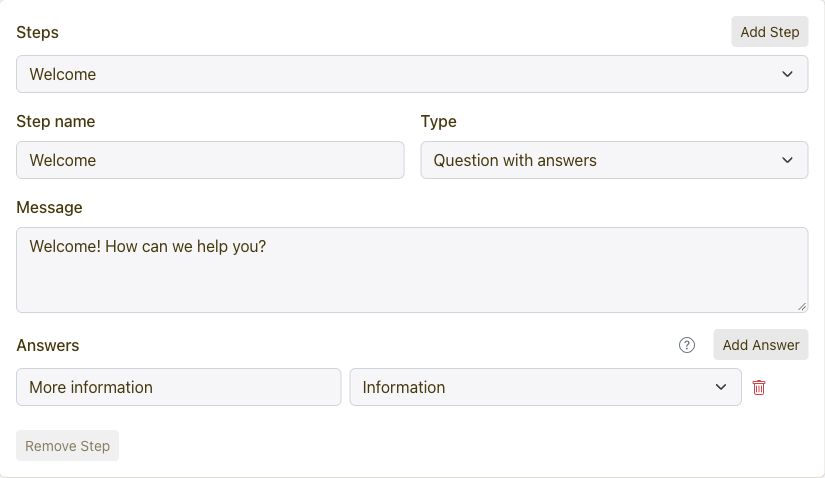
Build a short flow around the questions customers ask most often.
- Open Conversations and choose Agents.
- Create an Agent, name it and select the channel and sender or widget.
- Choose when it starts and which step should run first.
- Add question or message steps and connect each answer to its next step.
- Add a human handoff where the customer needs your team.
- Use Preview to test the route, then save with the intended status.
Create or configure your WebChat widget in Yournotify and use the supplied embed code on your website. Set up the widget identity and connect the people who will answer incoming messages.
Test the widget on the published website, send a sample enquiry and confirm that the exchange reaches your Conversations workspace. You can connect a guided Agent for the opening questions.
Yes. Add a Talk to a human step to the Agent and write the handoff message the customer should see. Route answer choices that need personal attention to that step.
This keeps repeat questions quick while giving customers a clear path to your team for detailed enquiries.